
What Are Agent Skills? An Instruction Manual with a Table of Contents
Contents
Agent Skills started as a feature in Claude and now have support across tools such as Codex, Cursor and OpenCode. Anthropic introduced Skills in October 2025 and announced the open standard on December 18 that year. Like MCP, the aim is to make the format usable across tools.
Let's go from the idea and the mechanism to three practical uses, then sort out what skills, prompts and MCP each do.
In One Sentence: A Manual with a Table of Contents
Agent Skills are instruction manuals with a table of contents, built around a mechanism for revealing instructions progressively.
There are three layers: metadata, instructions and resources. The discovery process exposes the metadata to the model; the other layers can be loaded when needed.
Think of metadata as the contents page, instructions as the chapters, and resources as the appendices. The agent can see what's available, then decide which chapters and appendices the job calls for.
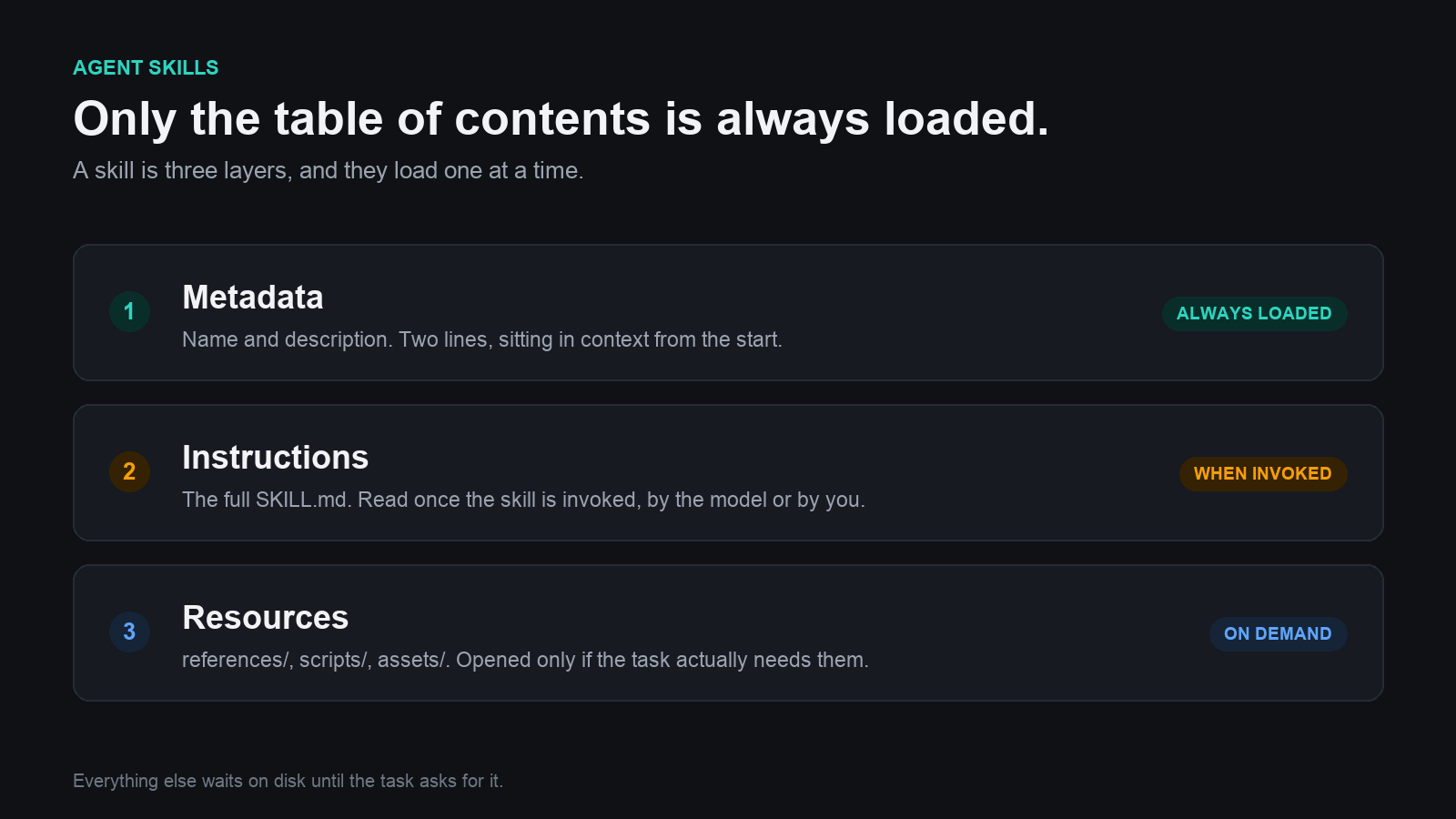
A short catalog makes the detailed instructions and resources easier to load when needed.
View full-size illustration
The advantage is that it can leave unrelated instructions out of context, making a large collection of workflows easier to use. The token savings depend on what gets loaded and executed, rather than following automatically from the format.
Write Your First Skill
Start with Claude Code, one of the early homes of Skills. On the filesystem, a skill is a folder.
The structure is simple:
- Give each skill its own folder under the project's
.claude/skills/directory. - Include a
SKILL.mdfile: uppercase name, lowercase extension. - Put the metadata and instructions in
SKILL.md. - Add supporting files to the folder as resources when needed.
Create a project folder, then .claude/skills/, then a folder named for the skill, such as srt-to-markdown. Add SKILL.md inside it.
At the top, put YAML metadata between two --- lines. The basic fields are name and description; the name should match the folder and use the standard's lowercase naming format. In the description, the important part is when the AI should use this skill.
The instructions can be more detailed. Use Markdown to make the requirements clear. For example:
You are a subtitle-text processing assistant. Convert SRT subtitle files into Markdown notes. Do not cut, summarize or omit any text. Preserve every word, and insert screenshot placeholders at key points.
That defines the basic skill. The essentials are the right directory structure, the right SKILL.md filename, and valid metadata.
It Starts with the Contents Page
Launch Claude Code in the project and use /skills to find the skill you created.
Give it an SRT file. The agent can recognize the subtitle task and select srt-to-markdown, or you can invoke the skill yourself. Once activated, it loads the instructions and works through the conversion, producing a Markdown note in the project. Whether it asks for confirmation depends on the action, permissions and invocation settings.
The important part is what gets loaded:
At first, the model can see the short metadata. When the skill is activated, the longer instructions enter context. Activation doesn't always require a separate “yes.” That's progressive disclosure.
Now make a second skill, video-ideas. Its description says to use it when a video creator is stuck for topics. The instructions say: “I'm a video creator. Here are some of my better-performing videos. Suggest 10 to 15 ideas along similar lines.”
With that skill available, say, “I don't know what video to make next.” The description gives the agent a reason to select it; you can also invoke it directly. Current Claude Code can pick up changes in watched skill directories during the session, rather than always needing a restart.
What Happens During a Skill Call?
With those two skills, the sequence is easier to see:
- You send the agent a request.
- The host discovers available skills and extracts their metadata; it doesn't have to rescan every file for every message.
- The model receives the relevant skill catalog alongside the request. Metadata is much shorter than the full instructions.
- The model can answer without a skill or select one that fits.
- When a skill is selected, its instructions are loaded for the model.
- The model uses that information to work on the request.
That's the point of loading on demand: you can have a collection of skills without carrying the full text of every manual into every conversation.
One more useful option: put the folders under ~/.claude/skills/ to make them personal skills available across your local projects.
Use It in Another Tool
A skill doesn't have to stay in Claude Code. Codex also supports the format, with project skills under .agents/skills/ and personal skills under ~/.agents/skills/. Move the skill into the supported location, allowing for client-specific metadata and script dependencies. In Codex CLI, /skills lets you find available skills.
Community repositories also collect ready-made skill folders. Put a compatible skill in the host's skills directory and it can become available. A domain-brainstorming skill, for example, can take “I make technology videos. What domain name would fit?” and produce suggestions.
Resources: Give the Skill Some Teeth
So far, a skill is mostly instructions. Resources are where it can become more capable.
A skill folder can include supporting files. The open standard describes these common locations:
scripts/for executable code.references/for additional documents.assets/for images and other resources.
Take the subtitle-to-Markdown skill. Its first version leaves screenshot placeholders in the notes. A Python script can use ffmpeg to extract video frames and replace those placeholders with image links. Put the script in scripts/, then add an instruction to call it after creating the Markdown.
The useful distinction is that executing a script doesn't require injecting all its source code into the model's context. That isn't the same as using zero tokens: the call and output can take context, and the agent may read the code if it needs to understand or debug it.
A second example is a writing skill. It combines the user's material into a draft, with one particular requirement: for software or AI topics, first read a writing sample to learn the desired approach.
Create a references/ folder and put a Markdown article you've written there. Tell the skill to read that sample when working with those topics.
Give it material from an open-source project's homepage. The agent can identify the topic, read the relevant sample, and use it as a reference for the draft. That's on-demand loading at the resource layer: the instructions point it to the document needed for this task.
How Skills and MCP Divide the Work
They overlap, but emphasize different things.
- Skills focus on reusable instructions, with progressive disclosure as a central mechanism.
- MCP focuses on connecting tools and resources.
A skill resembles a manual with a contents page; MCP resembles a standardized toolbox. Skills can load instructions as needed, while MCP supplies the tool connection. MCP doesn't require every tool definition to be loaded up front: hosts can use deferred discovery or tool search. Neither approach is automatically cheaper in tokens.
Neither is flawless. A skill can include a script, and differences in Python environments can make that script fail. An MCP server is software too, often written in Node.js or Python, with its own dependencies and failure modes. Packaging alone doesn't establish which will run more reliably.
On the other hand, a basic instruction-only skill can be just one Markdown file. Building an MCP server generally means implementing and running a service, which is a more involved development job.
A future “MCP 2.0” combining easy authoring with progressive disclosure could be an appealing direction, bringing those strengths together.
What They Look Like Together
Connect a GitHub MCP server with tools for creating repositories and uploading files. Then let each part do its job: the skill supplies the workflow, and MCP connects the tools. Repository creation and uploads use the connected account's permissions and need the user's authorization.
Add a follow-up step to the writing skill:
Check whether my account has a repository called
aidoc. If not, create it with the server's repository-creation tool, then upload the result with its file-creation or update tool.
MCP server documentation describes the available tools. Naming the relevant tools in the instructions can help the agent select them; the exact names depend on the server.
With the workflow invoked and the required access authorized, the skill can guide the writing, then the GitHub tools can create the repository and upload the file as part of the same task.
That's the division of work: skills reveal the instructions; MCP connects the tools that carry them out.