
An AI Coding Workflow in Five Steps to a Product You Can Check
Contents
Give an AI a request, and it may produce working software. Does that software match the thing you had in mind?
You can end up with a different product and a handful of bugs to go with it. This AI coding workflow works through the decisions between an idea and something you can actually assess. We will use a hypothetical desktop reader throughout, from choosing its first features to opening a text file yourself.
Before Step One, Choose an Agent
Options include Codex, Claude Code, OpenCode, and Cursor. We will use Codex for this example, with access to the project files, code-editing tools, and commands needed to run checks. Use a model available in your account. The broad planning and verification habits carry across tools, while their setup, permissions, and available capabilities differ.
Set Up Git and AGENTS.md
Create a folder for the code and add it as a local project in Codex. Ask it to initialize a Git repository and make the initial commit. Prepare the runtime and dependencies required by the stack you choose, including Node.js for the JavaScript-based example below.
Git saves versions of tracked code. A commit after a completed change gives you a point to inspect or recover if a later edit breaks something. Pushing those commits to GitHub gives the pushed work a remote copy. Keep track of what you have actually committed and pushed.
Then add an AGENTS.md file with persistent project instructions. Put it where it applies to this project and confirm that the current session has loaded it. Codex discovers instructions through a hierarchy, so the directory you work in and any more specific instructions matter. For this example, give the project two working rules.
First, make a commit after completing a coherent, reviewable change. That gives each finished piece of work a recorded version.
Second, add or update meaningful tests when behavior changes, then run the relevant checks before delivery. Ask the agent to fix failures and report the commands, results, and anything it could not run. Those instructions give it a job to do. The actual test environment and results tell you whether it did it.
Product Design — Cut the MVP Down One Decision at a Time
Suppose you want an ebook reader but have only a rough picture of it. Start by asking the agent what belongs in a minimum viable product, or MVP.
The aim is to get the main reading path working with a small enough scope to inspect and change. If you build every feature at once, discovering that the basic experience feels wrong can leave you with a lot to redo.
Take the proposed feature list and trim it. EPUB can wait, so the first version accepts TXT files. Skip automatic chapter detection and a table of contents for this version. Of three proposed themes, keep only the light theme. Bookmarks can wait too. Collect those decisions and send them together, giving the agent one consistent request. For a longer list, CueSpec on Mac lets you speak it into a local editable draft, review the wording, and explicitly send it to your selected Codex conversation.
Round out the scope with four more decisions. Accept UTF-8 text. Use vertical scrolling without pagination. Show a loading indication for large files. Keep a separate list of features deferred until later.
Ask the agent to turn those choices into a short product-design document. It should capture the direction and main features well enough to guide technical planning and implementation. Details can develop as you try the product.
A Demo Is Optional, and Backend Cost Helps You Decide
Some projects benefit from an interactive frontend demo before implementation. It has working interface controls and simulated data, with the real backend left for later. Click through it and ask for changes where the interaction feels awkward.
That can help in two ways. You discover problems that were hard to picture in prose, and the demo gives the agent a concrete reference for the intended interface. Update the product document as you revise the demo.
Backend cost is an important part of this decision. A knowledge base with document processing, retrieval, and model calls may be expensive enough that agreeing on the interface first saves rework. For this small reader, importing and displaying a TXT file may be straightforward enough to implement directly. Uncertainty about the interface and the cost of changing it also matter.
A request can be simple. Ask for an interactive demo with simulated data so you can judge the interface and flow before building the real backend.
Technical Design — Start a Focused Conversation, Then Save the Plan
You can continue in the current conversation or open a new one. A fresh conversation is a useful way to focus the technical discussion on the product document, especially after a long exchange about features.
Ask the agent to read that document and suggest an appropriate stack, keeping the first answer brief. If you already have a candidate, say so. Perhaps you have heard of Electron and want to understand whether it fits.
One possible plan is Electron with React, TypeScript, Vite, and Electron Forge. Ask about its tradeoffs and compare Tauri as another desktop option. Forge currently labels its Vite support experimental, so check the template and plugin guidance before adopting that combination. Once you have made the choice, have the agent save the technical design under docs.
Before Implementation, Give the Agent a Way to Check Its Work
This is easy to overlook. The agent needs to be able to run the project and its tests. A web interface may also need browser inspection. An Electron app may need desktop interaction tools to check the actual window. Ask the agent which tools it has and what is missing, then configure the appropriate supported tools for your client. Existing tools, plugins, MCP connections, and skills vary by setup.
Open the implementation conversation and point it to both documents. Ask it to read the product design and technical plan, implement the agreed scope, run the relevant checks, and commit the finished change.
Before accepting the handoff, read its report of what it ran. If a check failed or could not run, have it resolve or explain that gap. Passing checks improve confidence in the behaviors they cover. You still have the hands-on part ahead.
Human Check — Run It Yourself
Follow the project's documented launch command. An Electron Forge project may use npm start, as defined in its package.json. Suppose that command immediately fails. Give the agent the actual error, have it fix the cause, and run the command again. Once the reader opens, import a UTF-8 TXT file and try reading it.
Five Steps, With a Project Baseline to Revisit
The five steps are setup, product design, technical design, implementation, and human verification. Setup establishes Git and project instructions. Product design decides the scope and whether a demo would help. Technical design settles the stack and approach. Implementation includes running checks and fixing failures. Human verification means trying the result yourself and sending problems back into implementation.
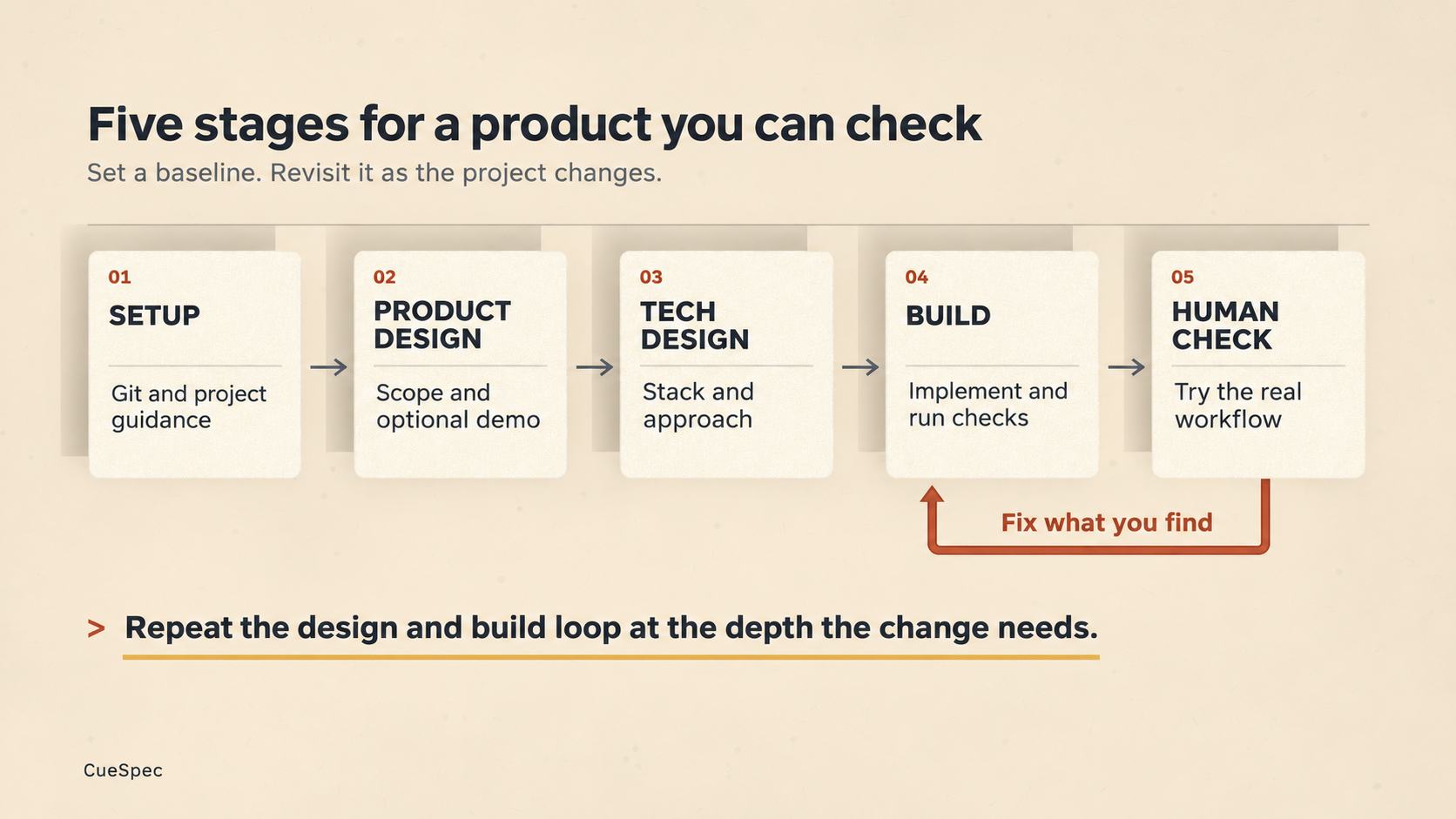
Establish a project baseline, revisit it when the setup changes, and return findings from hands-on checks to implementation.
View full-size illustration
Establish setup as the project baseline, then revisit it when dependencies, tools, or configuration change. For a new feature, repeat the remaining steps at the depth it needs. Full-text search in the reader follows the same route. Decide where search lives and how results appear, choose an indexing and search approach, implement and test it, then try it yourself.
How much detail you put into each step depends on the control you want over the result. You can let the agent make interface decisions or choose an implementation approach. Those choices still get made, and they affect how closely the product matches your expectations.
Scale the work to complexity and importance. A small, low-stakes change may need only a short request, implementation, and a check. A complex, important feature deserves a deliberate pass through all five stages.
Three Things to Keep in the Workflow
First, keep version history. AI-written changes can break something that previously worked. Save completed changes in Git so you can inspect how the project got there.
Second, give the agent runnable checks. If it can only write code, you take on all the back-and-forth of finding failures and reporting them. Let it run the tests and inspect the interface with the tools available to it.
Third, try the product yourself. Automated checks can miss awkward interactions and unexpected edge cases. Open the reader, load a file, and see whether it works the way you intended.
The amount of product and technical documentation can vary with the task.
This is one practical workflow to adapt as the tools change. Keep adjusting it to the project, the decisions you care about, and the checks you can actually perform.