
Four Pieces of Equipment for Working with AI: Screens, a Chair, a Microphone and a Server
Contents
Let's talk about four things worth considering for work in the AI era. If you're aiming to run a one-person business, these may belong on your list.
One: More Screens
Multiple monitors used to seem like equipment for particular jobs: video editing, programming. For plenty of other work, a laptop seemed enough.
The picture is changing.
Take writing. A workflow can involve three main tools: a browser agent, a command-line coding agent, and a desktop agent that gathers material into a usable document. Three agents, three kinds of work.
They also take time. Rather than wait for each to report back in sequence, you can have several tasks under way at once.
Suppose you're exploring a new tool. The browser agent examines the official site, summarizes what it finds and points out the parts you need to use yourself. The coding agent helps set up a framework and think through a theme. The desktop agent pulls scattered material into a document; a few sidebar comments give it the next changes to make.
Add another coding task and you're working like a supervisor: this one's ready, look at this; that one's ready, look at that.
Swipe up on the trackpad and there can be a dozen windows waiting. For that kind of multi-agent work, one screen can feel very small.
That's the first item.
Two: A Chair That Lets You Lean Back
Didn't expect that one? It can make a real difference to how the setup feels.
It's easy to spend the working day feeling nailed to a chair. You may know the sensation.
The old ergonomic-chair pitch often seems to be a beautifully engineered curve for your back, with you sitting upright to fit it. You can spend a lot on that curve and still keep shifting into every other position. Apparently, we aren't all worthy of our chairs.
A half-reclined position, with your feet supported, can look lazy. Possibly suspiciously like taking the afternoon off.
Call it reclined working. The practical point is to have support while still being able to reach the mouse and keyboard and see what the agents have produced on the screen.
Reclining is one of several neutral working positions described by OSHA, alongside upright sitting and other arrangements. Its guidance emphasizes changing position; it doesn't establish that reclining produces deeper focus or a longer state of flow.
For work that involves thinking and judging, a relaxed setup is an appealing preference, rather than a special posture proven to unlock creativity.
The bolt-upright typist pose doesn't have to be the only picture of working with AI.
(Feel free to forward that bit to your boss.)
Three: A Microphone
A dedicated microphone used to seem like something for a streamer or singer. For most desk work, the keyboard did the talking.
Voice changes that balance. There can be much less typing to do.
AI dictation tools make spoken input a practical option, though availability and price depend on the product. A workflow can lean heavily on voice without assuming every tool is free.
Some can also clean up repetition and awkward phrasing, and some format the result. That can feel dramatically faster than typing, but the gain depends on the task and the editing left afterward.
The bigger point is that a lot of our input is now directed at AI. Typing an essay-length prompt feels like a chore. Saying the same explanation aloud can feel much less demanding.
There may be an adjustment period. Putting a thought into spoken words can also be useful practice in expressing it clearly.
One part is awkward, though: talking to a computer in an open office.
It's enough to make separate work areas sound tempting in an office redesign. But partitions could also reduce the everyday conversation between people, so that isn't an entirely easy trade.
The principle I'd use is: speak when composing your own thoughts; use text when handing something to someone else, or reading what they've given you. Talking can be convenient for getting thoughts out, and reading lets the other person take them in at their own pace. That is a workflow preference, rather than a measured doubling of efficiency.
Voice also means you don't have to hunch over a keyboard for every exchange. Leaning back and talking starts to look like a plausible working setup.
Four: A Home Server
This one may feel less obvious today. I suspect it will become more familiar.
“Server” can sound intimidating. Here, it's a computer set up to stay available and run services over time.
What could it do? Start with uses that are already possible.
An agent can live on a small desktop computer or an older machine, with its files and tools there too. With the appropriate remote connection, you can ask it to work from your phone while you're away. That's the beginning of a home-server setup, with long-running work depending on the machine and services staying available.
A second role is having some computing capacity of your own.
As more work depends on AI, API outages, account limits or price changes can matter more. For some tasks, including work you'd prefer to keep local, a compatible model running on your own hardware can be useful. What it can replace depends on the hardware, power requirements and model capabilities; it isn't automatically an equivalent substitute for a remote service.
When AI becomes central to your work, losing access can start to feel like a power cut: suddenly, very little gets done.
Not everyone needs a generator at home. But a flashlight comes in handy.
A third possibility is a home server acting as a hub for daily life. Cameras, smart devices, robot vacuums, cooking robots and companion robots all need computing somewhere. Some simple or high-volume tasks could run on available local hardware, while devices and agents use the server to exchange information and store data. That capacity is still finite.
The difference is the role you give the machine: a service intended to remain available for work and home tasks, rather than only an interactive workstation. An ordinary personal computer can run background jobs too; a separate server isn't the only way to keep them going.
It's optional now. For some people, it may eventually become hard to do without.
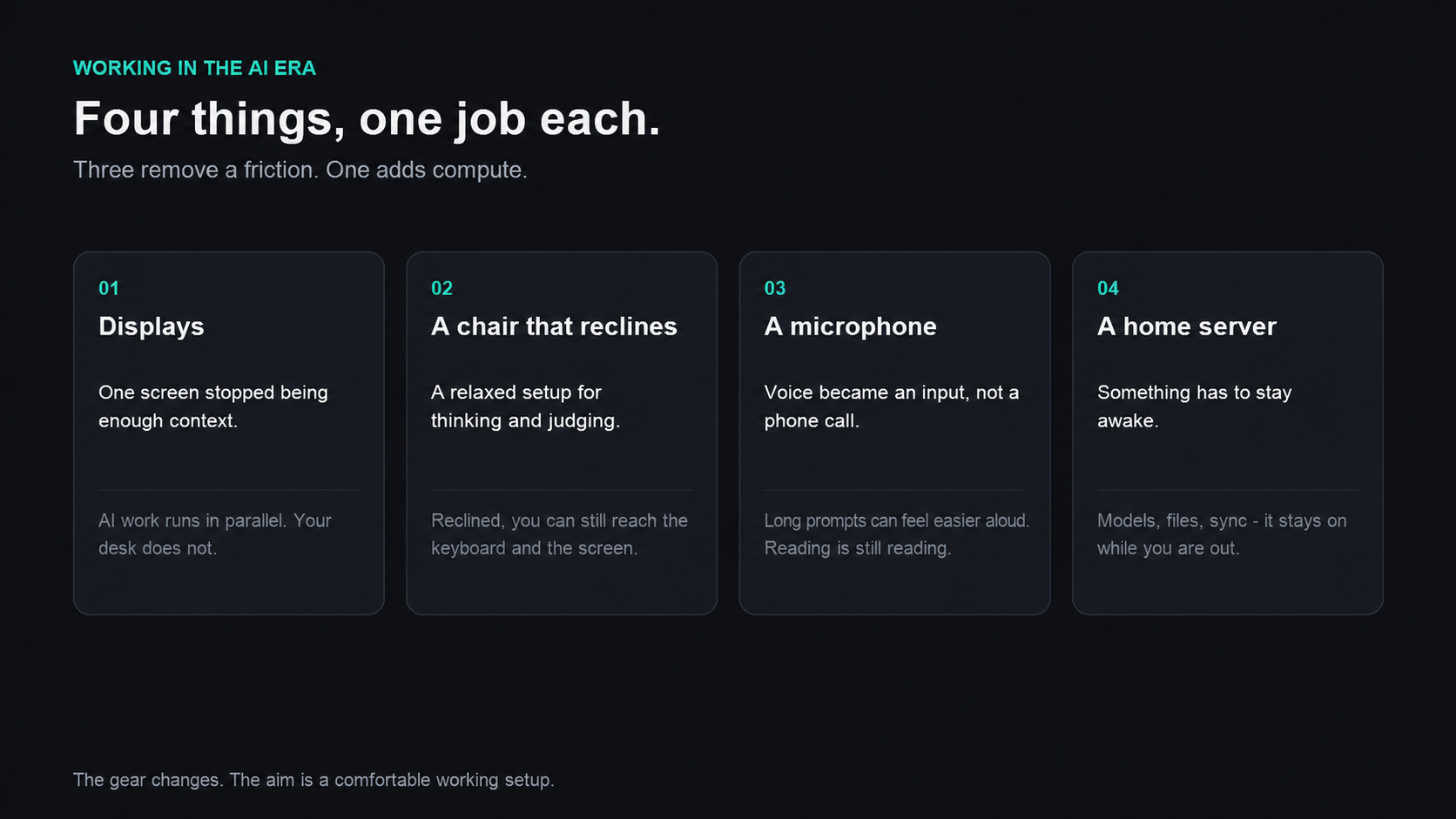
Each option addresses a different part of the working setup.
View full-size illustration
Put the Four Together
Agents run on the server. You lean back, speak instructions into a microphone, and look across the screens to see what they've done.
The role starts to look more like management.
AI may still seem unreliable at doing a whole job today. Its ability to handle more of that work may arrive sooner than we expect.
Our own adjustment to stepping out of execution and into judgment could take longer.
I'll go first, then: time to lean back. Here's to working comfortably, effectively and with a little less strain in the AI era.