
Claude Code Skills: Pick the Problem, Then Pick One or Two
Contents
A long list of Claude Code skills can leave you with more names to remember and no clearer idea of which one to use.
Start by grouping the problems instead. Four useful groups are getting the agent started well, delivering changes reliably, handing off repetitive work, and making the work understandable to someone else. Find the group behind your last round of rework, then choose one thing to try.
The first group below includes three identifiable projects. The other groups describe workflows and the outputs to look for; they aren't a directory of packages you can install by their labels.
Group One: Get the Agent Started Well
This group addresses the early frustration: the agent starts working, but loses the plan or heads in the wrong direction.
Planning with Files, from OthmanAdi/planning-with-files, keeps task_plan.md, findings.md, and progress.md on disk, with instructions for restoring the selected task's planning state. That gives a later session something to read after context has been compacted. It still depends on keeping the files accurate and restoring the right task; it doesn't guarantee that no context can ever be lost.
Superpowers, from obra/superpowers, combines skills into a development workflow. Brainstorming and test-driven development are among its modules. Its value is the relationship between design, planning, implementation, and verification. Read the installation path for your host: the repository documents Claude Code plugin installation and separate routes for other tools.
Skill Creator, from Anthropic's anthropics/skills repository, helps draft a skill, try it against test prompts, evaluate the results, and improve it from feedback. This is Anthropic's implementation, not OpenAI's similarly named skill. It can help express a workflow you need, but writing the skill doesn't supply missing tools, permissions, or a working environment.
Those are three different gaps: keeping state available, adding a development process, and creating guidance for a workflow you can't already cover.
Group Two: Go from Written Code to Reliable Delivery
Here the problem is “It finished, but I'm not ready to release it.”
A context handoff should make the requirements, constraints, and interfaces available before implementation. The useful output is a clear task description with the relevant files and boundaries, so the agent doesn't have to infer the request from scattered messages.
A test workflow should choose checks that fit the change: unit, integration, or snapshot tests where appropriate. Ask what behavior each check covers and read its actual result. A promise of three layers of testing is less useful than knowing which failure a test would catch.
A release checklist should cover the steps your project requires before shipping. Give it the target version and release conditions, then expect a record of completed checks, failures, and remaining decisions. Scheduling or running those checks needs real tools and authorization.
In order, these workflows clarify what goes in, check the behavior during development, and assess readiness at the end. A related need is behavior-preserving refactoring: give the agent the intended scope and existing behavior checks, then inspect small changes and the results that support them. You may already have enough instructions and tooling for some of these jobs without adding another skill.
Group Three: Hand Off Repetitive Work
This group starts with actions you keep repeating.
Parallel delegation divides suitable work among agents—for example, exploration, implementation, and verification. It needs a host that can delegate, a clear assignment for each worker, and coordination of shared files or separate workspaces. Writing “use a swarm” doesn't create that machinery.
CI failure repair starts with the failing job, logs, and enough environment information to reproduce or investigate the failure. Ask for the cause, the smallest justified repair, and the check that ran afterward. Without a reproduction or comparable evidence, changing the code can become guesswork.
Scheduled work needs a trigger as well as instructions: what should run, when, with what access, and what should happen if it fails? A recurring check requires a scheduler or an equivalent host facility, plus authorization for its actions. Installing a skill alone doesn't make it run overnight.
Those are three different handoffs: do it alongside other work, do it after a failure, or do it at a specified time.
Group Four: Make the Work Understandable to Someone Else
The second person might be a teammate—or you, three months from now.
Align the specification: record the goal, scope, and acceptance criteria before implementation. The output should let the next person distinguish the requested behavior from ideas that haven't been adopted.
Explain the change: give the reviewer a description of what the PR changes and why, tied to the actual diff. A readable summary should help them inspect the code, not replace that inspection.
Record decisions: keep the important tradeoffs and the reasons for choices that were actually approved. Keep proposals distinguishable from decisions, so a later reader doesn't mistake a suggestion for the direction the team chose.
Alignment, explanation, and a decision record help at different moments: before work starts, when it is handed over, and when someone returns to it later. They can feel like overhead until you're the person trying to reconstruct the reasoning.
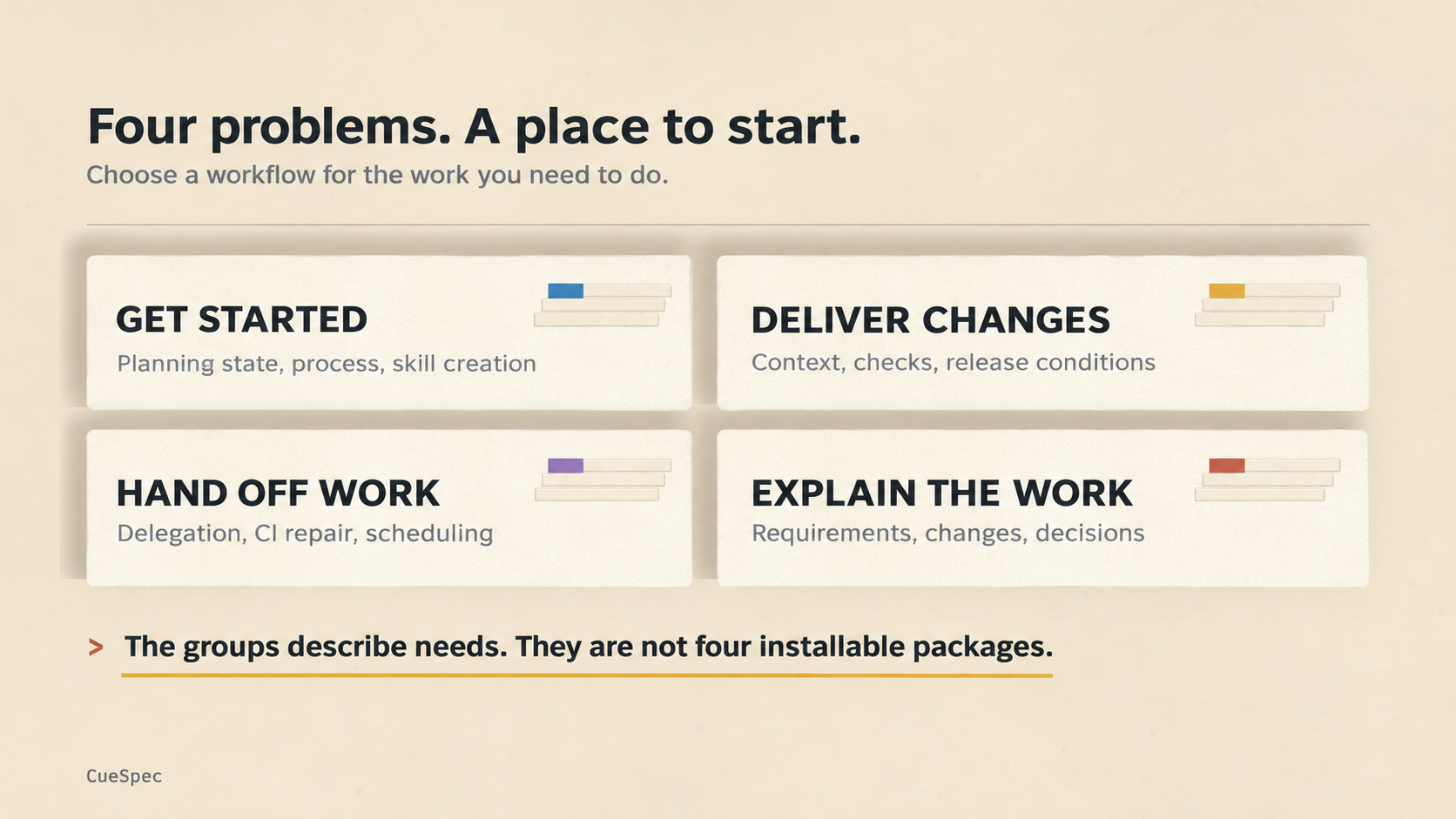
Start with the problem and choose a relevant workflow. These groups describe needs rather than installable packages.
View full-size illustration
Choose by the Job, Not by Rank
The groups describe different problems. There is no useful overall rank between preserving planning state and explaining a PR; one doesn't replace the other.
Try a simple selection process: identify the cause of your most recent rework, choose one relevant workflow, and try it on ordinary tasks. A week can be a convenient trial period, rather than a proven optimum. If you still want to keep it, consider a second addition. For a packaged skill, start with an identifiable project such as the three in the first group; for a workflow need, first check whether your current setup already covers it.
A skill helps when it is selected and used for the relevant task. Its description, your request, and the host's invocation rules affect that. An installed file that never fits the work adds maintenance without solving the problem you chose it for.
Read the requirements too. Some skills contain instructions; others expect files, scripts, external services, or a development environment. Anthropic's MCP Builder, for example, guides a four-phase process for building an MCP server. You still need the relevant SDK, API information, implementation, and tests. Adding the skill doesn't instantly connect every service.
Three Ways the Groups Overlap
Use this as a set of signposts rather than a strict taxonomy.
One capability can serve more than one group. Anthropic's Webapp Testing skill uses Python Playwright scripts for local web-app interaction, screenshots, and browser logs. That can help both delivery checks and repeated browser work. It needs the Python/Playwright environment, browsers, and a runnable application; the instructions don't establish those by themselves. Other needs, such as comparing desktop and mobile layouts or diagnosing a screenshot, may overlap without requiring separate packages for each label.
Upstream and downstream work can be split apart. Updating documentation and preparing release notes are connected parts of shipping a change. One needs accurate implementation details; the other needs an explanation of what users will notice. Look at the handoff between them before installing two independent workflows.
The group names describe situations, not modules. Tests belong in the delivery group here, but also matter during implementation and automation. Don't expect every task involving tests, screenshots, or documentation to live in one box.
The groups help you find where work is going wrong. Then inspect the specific workflow and its inputs and outputs.
Two Questions That Keep Coming Up
Will an installed skill run automatically? That depends on the skill and host. Some can be selected from their descriptions; others need an explicit invocation. Read the project's instructions and check whether the skill was actually used on your task.
Can it be installed in another tool? Use that project's documented route for the target host. A similar name doesn't establish the same package, and a Markdown file doesn't guarantee that hooks, scripts, or tools work identically elsewhere.
Keep the Ones That Solve Your Problem
You don't need to remember a catalog of names. You need to recognize the gap when it appears, find guidance or tools that address it, and check what they change in the work. One or two useful additions are a better place to start than a configuration full of unexamined possibilities.