
How a Content Team Can Put AI into Its Workflow
Contents
Imagine a small US video team preparing an episode about coastal wildlife. The team in this example is hypothetical: it gives us one production to follow from the first idea to the final review. It has familiar pressures—a release calendar, shoots to arrange, footage to manage and more ideas than time.
There is something else to decide: where AI belongs in that work.
Take a difficult shot in the opening sequence. Generating a reference might help explain it, but “one prompt and it's done” is a poor production plan. The team may need several attempts, with someone choosing what is useful and rejecting what doesn't fit.
AI can help with research, code and production tasks. That doesn't settle which parts of this episode it should handle. Following the workflow makes the choices more concrete.
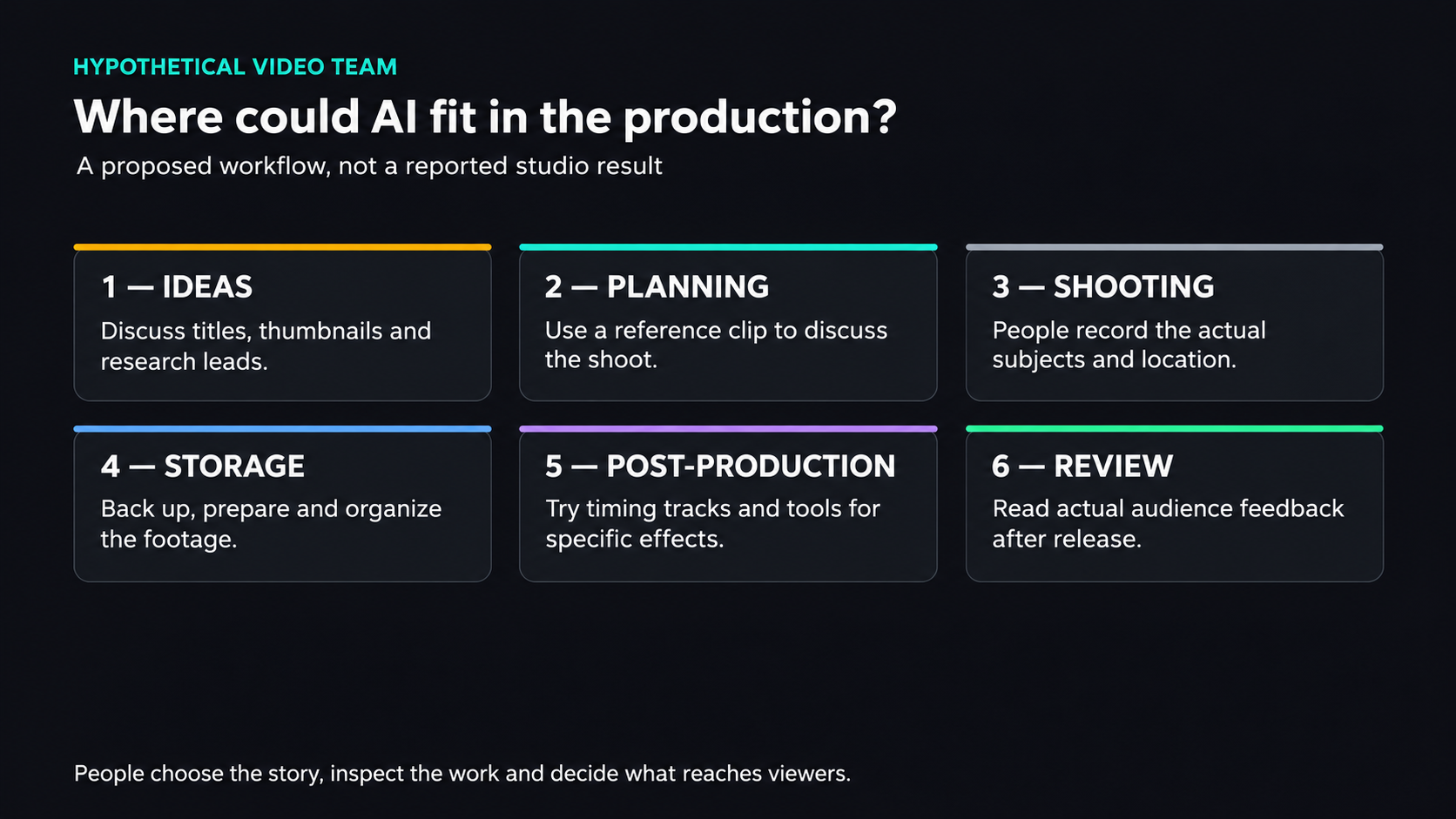
A hypothetical production example: AI can assist selected tasks while people choose, film, edit and review the episode. The diagram reports no studio outcome or measured efficiency gain.
View full-size illustration
Ideas: Title and Thumbnail First
For this episode, the team starts with the title and thumbnail. What would make someone interested enough to click, and what would the finished video need to deliver?
The writer-director can bring a proposal, but an editor, camera operator or producer might have the stronger opening idea. Let the people doing different parts of the work contribute.
An ideas channel gives them somewhere to post a title or image. The team can choose a promising combination and use it to guide the episode. Whether that choice improves retention is something to learn from the eventual release, rather than assume from the pitch.
An assistant's first role can be gathering background, with people checking the claims that matter to the story.
For the coastal-wildlife topic, ask it for research leads and possible visual approaches. A generated thumbnail can make a pitch easier to discuss. An assistant equipped to search could also suggest related topics, but an interesting suggestion still needs someone to decide whether the team should pursue it.
Planning: From Text-to-Video to Video-to-Video
The writer-director researches, writes the script and plans the shots. Words and still images can leave a practical gap: how should a particular sequence move, and what would the camera crew actually have to capture?
One possible planning sequence is text → AI reference video → filming → a new video → editing. The reference sits before the shoot, not in place of the whole production.
For this hypothetical episode, generate a rough reference for the opening movement, then discuss how to film it. Alternatives can help the crew compare a slow reveal with a closer, more immediate shot.
The reference is a planning aid. The crew still has to capture the real location, subjects and action for the finished documentary.
The finished piece can differ substantially from the generated clip. What matters is that the reference gives people something specific to discuss: camera movement, shot order and the feeling they are aiming for.
Shooting: Much the Same, Apart from Managing the Gear
Once the crew agrees on the sequence, the physical job remains: bring the equipment, light what needs lighting and record the footage. A useful preview can guide that work without doing it for them.
For a small team, gear selection also affects what gets filmed. A light camera kit may be easier to take along than a larger rig with extra accessories. Compare the equipment the shot needs with what the crew can carry and set up; the most expensive item in storage needn't be the most useful one on this trip.
An underwater sequence gives specialized equipment a reason to earn its place. If the episode needs real footage below the surface, the crew needs a suitable filming setup. A convincing generated image of wildlife would serve a different purpose from a recording of the animal they went to document.
Post-Production: Plan for the Footage You Bring Home
After the shoot, someone needs to offload the cards, back up the material and prepare files for editing.
The team can estimate storage from its recording settings and expected footage, then allow room for backups, proxies and the finished project.
Material needed for editing should be available on storage that supports that work. Older footage can follow a different archive plan, with clear records of where it lives and how to recover it.
Capacity and retrieval are separate considerations. A low-cost archive is useful only if the team can find and restore the material when it needs it. Choose that arrangement around the footage and access pattern.
AI in Post-Production: Two Tracks
Post-production brings two different roles into view: AI-led work and AI-assisted work.
For the hypothetical wildlife episode, the real footage remains the center of the documentary. Generated material could belong in a clearly different creative task, such as an illustrative dream sequence. Make that distinction before the edit, rather than allowing an experiment to become a claim about what the camera recorded.
First, a temporary voice track. A synthetic reading of the script can help an editor lay out the sequence and judge timing before the host records the final narration. Use it as a working track to check the cut.
The host can then record the final voiceover with the microphone and delivery chosen for the episode. Compare the result in the edit; don't assume that the temporary track is the right finished performance.
Second, generated video for an illustrative sequence. If the story calls for an imagined scene, the team can explore a few visual directions before committing to a particular treatment. The job still includes choosing the shots and making them fit the story.
Third, assistance with an effect. A tool can work on a specific production problem without generating the whole scene.
For green- or blue-screen material, CorridorKey is one real tool to investigate. Its project describes taking footage and a rough alpha hint to produce foreground and alpha information. The team's sample footage, available hardware and the project's requirements would determine whether it fits this edit.
Fourth, a synthetic presenter. Before putting an avatar in the host's place, ask why viewers came to this episode. If the host's observations and presence are part of the value, replacing that person may work against the reason to watch. A technically usable result and the right creative choice are separate judgments.
So, Has AI Replaced the Team?
In this proposed workflow, people still choose the story, film it, edit it and decide what reaches the audience. AI has several jobs, but those jobs don't add up to a finished episode by themselves.
The more useful question is where it changes the work: a visual reference for a difficult explanation, a temporary track for timing or a tool for an effect. Each needs a purpose in the production.
Reviewing the Numbers: What Does the Opening Deliver?
After release, the team can examine its actual platform data and audience feedback. That is when the hypothetical plan meets a real result.
Start with views and retention alongside the video itself. Look at where people leave, what appears just before that point and whether the title and thumbnail set an expectation the opening fulfills. An assistant can help organize information you supply, while the team remains responsible for reading the actual data correctly.
For a host-led episode, one question is whether the introduction should begin with the host or the wildlife footage.
Compare what was actually released and what the audience saw. Differences in topics, distribution and openings can all affect the result, so the host's time on screen alone doesn't establish a cause. Use the observations to choose a specific change to try next time.
What About the Anxiety?
For a team considering these tools, uncertainty is understandable. A new capability can change the job before anyone knows how valuable it will be in their own process.
Try a bounded task and inspect what it produces. A useful result on that task is a better basis for the next decision than a prediction that AI will either do everything or nothing.
A team-sharing session can make those trials easier to discuss. Someone might prototype an internal tool for organizing meal orders, for instance, then show what works and what needs improvement. The point is to learn from a concrete attempt and keep improving it.