
What Separates a Desktop Agent from a Chat Box? It Can Reach into Your Folders
Contents
Getting local material into a chat box usually means copying and pasting it, or uploading files within the formats and limits it accepts.
A desktop agent works differently. It can read and write files on your computer within the access you've granted it.
That's the dividing line. Can it do the work, as well as talk about it?
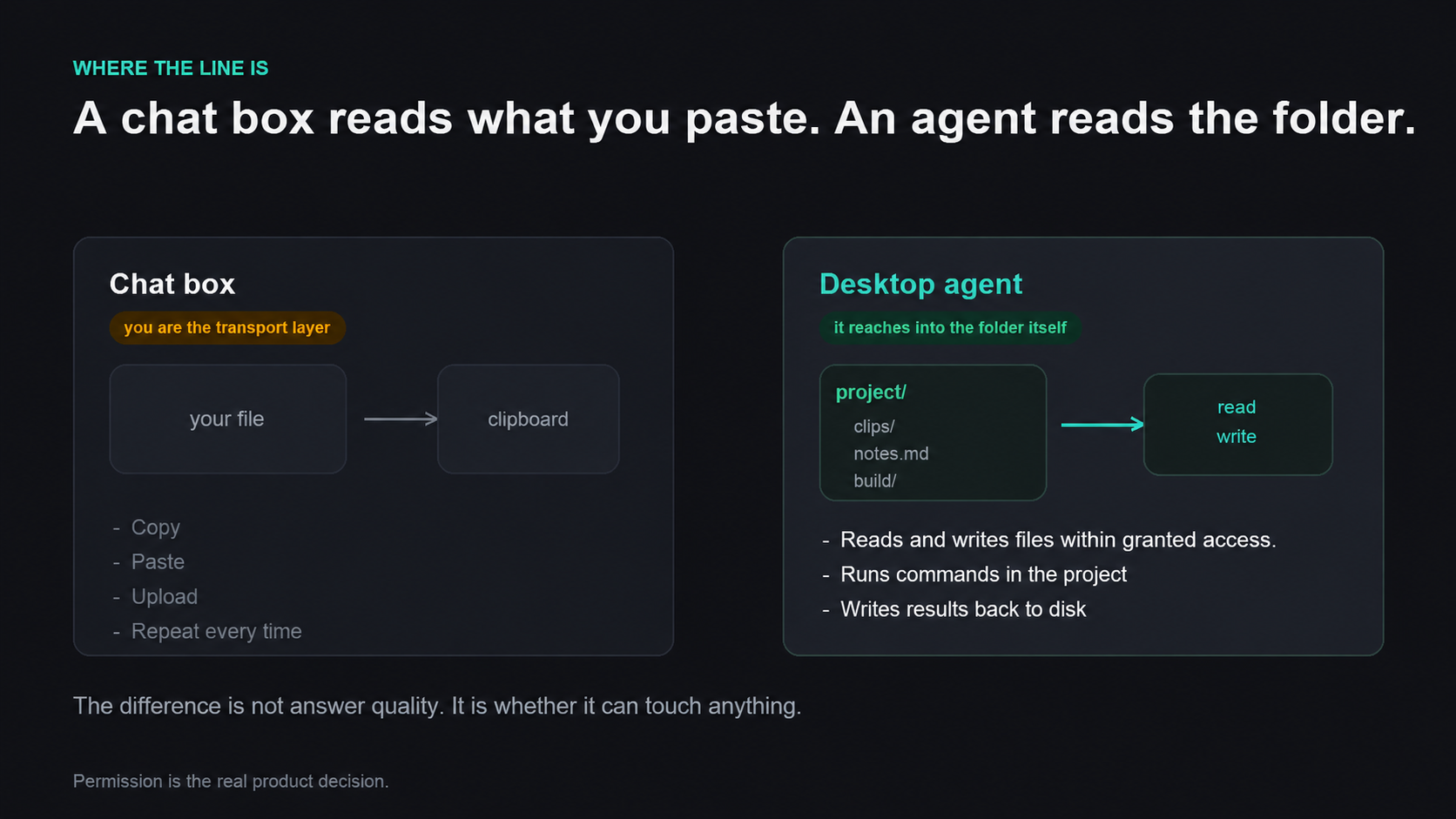
A desktop agent can work with files within the access you grant.
View full-size illustration
A Project Is a Folder
Open Codex and you'll meet the idea of a project. Choose a local folder, and that folder becomes the project: a place where the agent can work with the files its permissions allow it to access.
First, though, you choose its permissions. Three common options are:
- Ask for approval: It can read and edit permitted workspace files and run local commands. Access beyond that boundary, including internet access, depends on your settings and may need approval.
- Auto-review: An AI reviews eligible approval requests, allowing some actions and asking you about others. This changes who reviews the request, not which files the agent can already access.
- Full access: It can work beyond the usual workspace boundary, including actions that could delete files. Operating-system and service restrictions still apply.
Auto-review can be a useful starting point if you don't want to judge every request yourself. Let's face it: being the person who clicks Approve doesn't automatically make you better at spotting trouble.
A Real-World Job: Renaming 80 Video Clips
Take a folder of more than 80 video clips, all with gibberish filenames. At editing time, you can't tell what's what. You want names based on what actually appears on screen.
A chat box can't reach into that folder on its own. Codex can, with the right access.
The job starts with counting the files, then extracting frames to see what's in them. Rather than inspecting every frame separately, it can assemble contact sheets and examine them in groups.
The resulting names describe the scenes: a pianist in a concert hall, close combat on a snowy mountain, a woman in a qipao selling hot drinks in a night alley. Even the naming pattern is useful: number, scene, action.
That work may need no additional approval if every step is already covered by the folder access and command permissions you've granted.
You can also open several chats in the same project. Each has its own context, but they share access to the folder. In another chat, ask for a montage of the landscape shots: the agent can find a suitable tool, request any access it needs, and stitch them together with ffmpeg.
The things it produces, whether PDFs, Markdown files or PowerPoint decks, can be saved directly on your computer. A local output file doesn't mean the model service never processes the content in the cloud.
A Second Hand: The Command Line
Default workspace permissions can cover local commands as well as file edits; network access and actions outside that scope depend on the selected settings. Plenty of useful jobs need commands: extracting frames, cutting video, cloning a repository, installing dependencies.
This is where a desktop agent can catch you off guard.
Ask it to install Node.js, and automatic review may let the installation proceed if the request is approved. Ask, “There's an agent called Hermes that's getting attention. Help me install it,” and the job can involve finding the intended project, following its official instructions, and checking that it runs. The name alone isn't enough to identify the right repository.
A fair amount of what gets sold as “deployment help” comes down to this kind of work.
One thing to keep in mind: a code preview isn't necessarily a full editor. What you can edit depends on the interface and file type. An external IDE is still useful: install one, initialize Git with git init, and open the project there from the app's editor shortcut.
After that come skills and command-line tools. These aren't always as easy to identify as Git, so supply the exact repository, or use a skill-finding tool to locate the right one.
One Last Thing
The point is simple: plenty of the things you want done on your computer are already jobs a desktop agent can take on.
It can reach into a folder, use a terminal, and change files. Your part is to say clearly what you want, and decide how much access to give it.