
Git Worktree: Stop Your Codex Windows From Fighting Over One Directory
Contents
If you use Codex to build a feature and fix a bug at the same time, this may sound familiar: window A is working on login, window B switches branches for another task, and suddenly A is looking at different files and a screenful of errors. Git blocks a switch that would overwrite conflicting local changes, but a switch it allows still changes the checkout both windows are using.
The first response is often to create more Git branches.
Branches give your commits separate lines of development. They don't give several tasks separate working directories. For that, Git has worktrees.
Branches Set the Route. Worktrees Provide the Desks.
A Git branch is a pointer to a commit. Names such as main and feat/login mark routes your work can follow. Open five windows in the same directory, though, and you still have one set of working files.
When you switch branches, Git updates that directory to the selected checkout, preserving local changes where it can and refusing conflicting switches.
A linked worktree gives the same repository another working directory, with its own HEAD, index (staging area), working files, and local build output. Repository objects and most refs, including branch names, are shared. Each linked worktree has a top-level .git file pointing to its private management directory; it isn't another complete .git folder. The shared history can still branch.
You can have dozens of branches and one working directory, or several working directories attached to the same repository. Those are different arrangements.
Think of a branch as a route and a worktree as a desk. For the manual workflow below, use one window, one worktree, one branch, and one task. That's a useful convention, not a requirement of every worktree: Codex-managed worktrees start with a detached HEAD by default, without checking out a named branch.
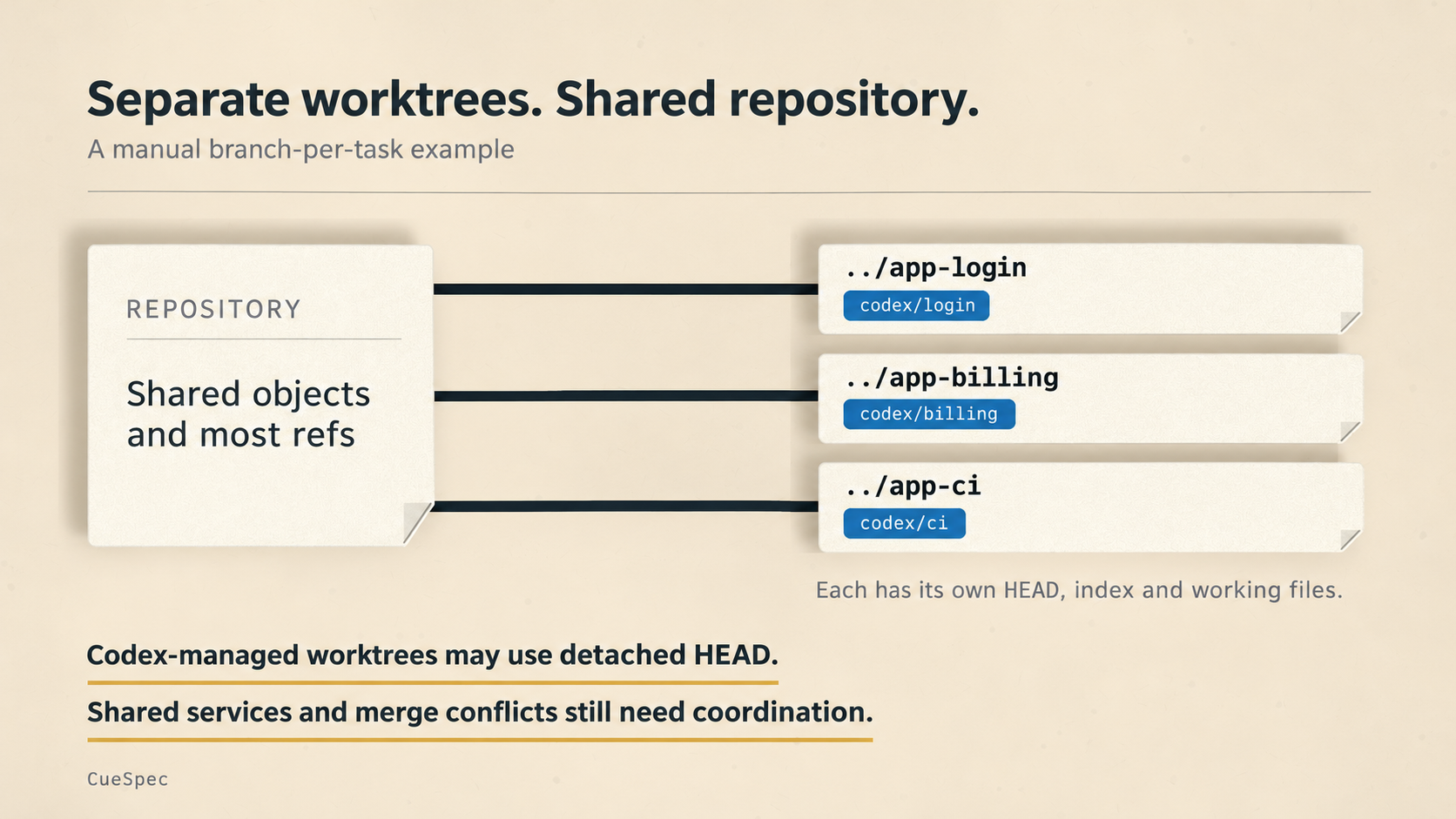
This manual example uses a branch for each task. Codex-managed worktrees may use detached HEAD; shared services and merges still need coordination.
View full-size illustration
Why It Matters When You Have Several Tasks Open
Parallel work is part of Codex's appeal: one window changes a backend endpoint, another fixes frontend state, and a third repairs CI. The trouble starts when all three work in the same directory.
One window may be reading a file while another switches branches, installs dependencies, or generates new files. The first task's view of the project can go stale while it's still working.
Three problems show up repeatedly when the windows share a directory.
First, overlapping file edits. Two tasks change the same file, and a later write may overwrite changes or invalidate assumptions the other task was using.
Second, changes to the local environment. One task upgrades dependencies while another runs tests. One changes .env.local while the other assumes the configuration is unchanged. An agent can handle a lot of work; moving the ground beneath it doesn't help.
Third, branch-switch confusion. You ask B to switch to a fix branch, and A's files change too. Both windows are looking at the same checkout.
With worktrees, A can fix login in app-login, B can build billing in app-billing, and C can repair the pipeline in app-ci. Each has separate working files. They can then commit their changes, open pull requests, and merge.
Four Commands You'll Use Most
Suppose the main project directory is app, and main is the branch you want to start from. From inside app, create a new workspace beside it. This assumes main exists and the new branch name and destination path are available:
git worktree add ../app-login -b codex/login main
This creates codex/login from main and checks it out in ../app-login. Open a new Codex window in that directory and give it the login task.
To see the existing worktrees:
git worktree list
Once the task is tested, its changes are saved and merged, and you've checked for local files you still need, remove its worktree:
git worktree remove ../app-login
Git normally refuses to remove a worktree with modified tracked files or untracked files. Resolve those first rather than forcing the removal.
If you previously deleted a worktree directory by hand, Git may still have a stale registration. Clean up eligible stale entries with:
git worktree prune
Pruning cleans up administrative records for missing worktrees. It doesn't delete active working directories.
The workflow is: create the worktree → open Codex there → test and commit → merge into main → remove the worktree.
Consistent names help. Use project-task for directories, such as app-login, app-search, and app-ci, and codex/login or feat/login for branches. You can tell which task a window belongs to and where to look when something breaks.
Why Not Just Copy the Project?
A separate copy can isolate working files too. What a cp command copies depends on its options and what you include: it may duplicate Git data, dependencies, and caches. You also have another copy's branches and remote configuration to keep straight. Worktrees give Git an explicit record of the relationship, with separate working directories sharing repository data.
In this workflow, branches and worktrees work together. The branch tracks a line of development; the worktree gives it a place to happen. One task, one worktree, one branch is a manageable way to pair them.
A Few Traps
Git normally prevents the same branch from being checked out in two worktrees. Don't try to give two windows separate workspaces while putting both on feat/login.
Ports and local configuration still need attention. Give simultaneous development servers different ports. Git doesn't automatically copy an ignored .env.local into a new worktree; provide the required configuration yourself. Codex has a separate .worktreeinclude mechanism for copying selected ignored files into local managed worktrees. That doesn't apply to the command-line worktrees created above. A shared database or external service also stays shared unless you isolate it separately.
Directories such as node_modules, dist, and coverage can consume space in each worktree. How much dependency setup must be repeated depends on your package manager and cache arrangement. Extra directories aren't free, even when some downloaded packages can be reused.
Be careful with stash: its records are shared across the repository, not kept in a private drawer for each worktree. Small commits, or a temporary WIP commit on the task branch, can be easier to track.
What It Doesn't Solve
Worktrees separate working directories. They don't merge your changes for you. If three branches change the same code, someone still has to reconcile the results.
They can move overlapping code changes out of a shared directory and into a deliberate merge step. They don't make those conflicts disappear. Small commits, frequent integration, and reliable CI still matter; worktrees give those tasks room to happen without every window changing the same files underneath the others.
A branch gives your code a route. A worktree gives the task a desk. Give each parallel task its own desk, and there's less to trip over while the work is underway.