
Let an AI Agent Work Longer: Two Loop Designs and a Team of Subagents
Contents
Give an AI a task before bed, let it work for four hours, then come back to review it: that's the appeal of a long-running agent. Keeping it moving takes more than a long prompt. Anthropic's November 2025 article on agent harnesses examines how work can carry across sessions.
Here are two approaches to that problem: a Ralph-style loop that starts fresh sessions from a shell script, and a main agent coordinating specialist subagents. The second gives you more room to design how planning, development and testing fit together. These are two workflow choices, not the only ways to run a long task.
Think of vibe coding as three ranks. Bronze: say whatever comes to mind, then call the AI an idiot. Gold: break the job into steps and watch each one, but stay at the keyboard. The top rank: design the harness, give it the task and step away.
Why Long Tasks Can Stop: Limited Context
A long task can fill the available context with instructions, code and earlier attempts. It becomes harder to keep the relevant information in view. Context limits can interrupt the work, although compaction can extend a session; usage limits, permissions and a broken environment can stop it too.
Anthropic describes setting up the project first, then making incremental progress across sessions. A new session reads the recorded state, works on a particular feature and leaves a clear handoff. Each starts with its own context window. It's the Gold approach—plan the work and tackle one piece at a time—with files carrying the handoff that previously needed you at the keyboard.
Approach One: A Ralph-Style Loop with Fresh Sessions
In the fresh-session design considered here, a shell script maintains a while loop and invokes the Claude CLI for each round. Three details matter: the script owns the loop; the CLI runs the task noninteractively, within the tools and permissions available there; and each session receives the same starting instructions. That doesn't make every Ralph implementation identical: some preserve sessions and include their own stopping conditions.
The same prompt can lead to different work because the state lives in files. Each round reads the requirements and progress, picks the most important unfinished task, does it and records completion. Session one works on task one; session two picks up task two. The files connect them.
A loop alone can leave you with a whole night's worth of spaghetti. Its instructions need two things: the relevant context—requirements, progress, working rules and lessons from earlier failures—and tests that check the result. Having the developer check its own work is useful, but another subagent can provide a separate testing pass.
You can write the shell loop yourself or examine an existing Ralph implementation, such as Ralph for Claude Code. Prepare the requirements and follow that project's README for planning and execution. Its exit rules, session behavior and usage controls are part of the design, too.
Approach Two: A Main Agent and Specialist Subagents
The central idea is to give different pieces of work their own context. Subagents provide that separation.
Use the main Claude Code conversation as the coordinator. In this workflow, it delegates implementation and keeps track of the work; planning, development and testing have their own subagent definitions. Design the business workflow first, then write the coordinator's and specialists' instructions around it. Coordination is a division of labor you choose, not an inability of the main agent to read or write code.
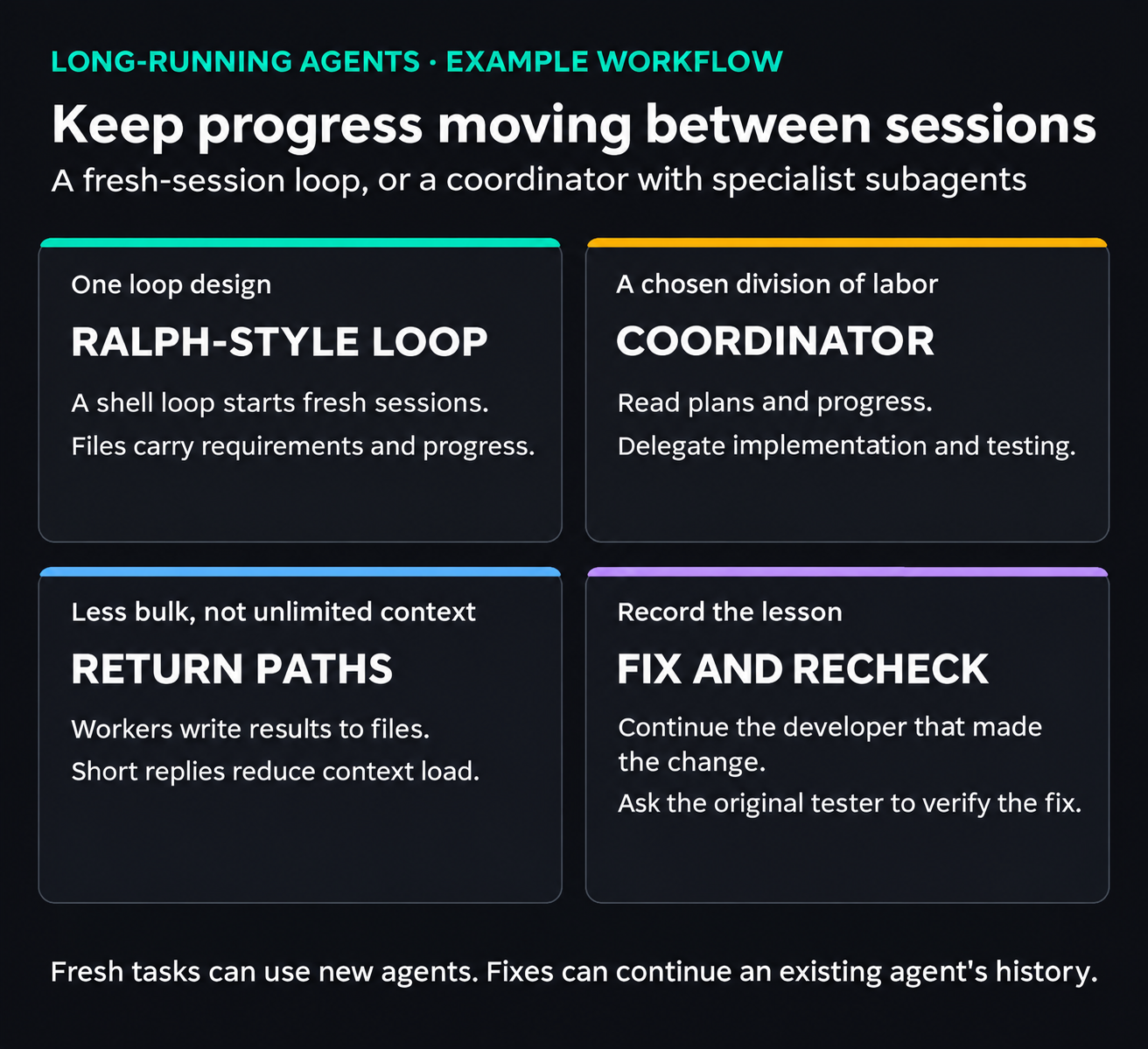
Two workflow choices for longer tasks. Returning paths reduces long replies, while continuing a developer or tester preserves the history needed for a fix. Neither approach removes usage, permission or environment limits.
View full-size illustration
Walk through the Workflow: Return File Paths
Take material for a video as an example. Preparing assets and editing can involve plenty of repetitive work. A deck with dozens of pages also gives you a reason to break the work down: generating and testing one page at a time lets you address its layout before moving to the next.
The coordinator receives the requirements document and passes its path to the planning subagent, which writes a plan and returns that file's path. The coordinator reads the plan, selects a task and starts a developer from its definition. The developer writes the result and returns its path. The coordinator passes the relevant paths to a testing subagent, which writes a report and returns the report's path.
If a test fails, send the findings back to the same developer so it can continue with its earlier context. Ask the tester that raised the issue to check the fix. Keeping that history can help both sides follow the problem. If the task passes immediately, update progress, read the next task and start a new developer for it.
The Coordinator's Prompt Follows the Workflow
The coordinator maintains the process, so its instructions should describe that process. You don't have to compose every line yourself: explain the workflow to Claude Code, ask it to write the document, then read and revise it.
For this example, tell the coordinator to delegate coding and avoid loading whole implementation files unless it needs them. It still reads the plan and progress. Keep the agent IDs returned by the tools so it can address the right worker later. Start a planner with the Agent tool and request the plan's path. For each development task, start three testing subagents in parallel and collect their verdicts and report paths. Allow at most three correction cycles, then leave an unresolved failure for a person. Three testers and three cycles are this example's limits, not Claude Code requirements.
The rule is simple: the developer fixes the bug it wrote, and the tester checks the bug it reported. In the current Claude Code documentation, SendMessage can continue a resumable subagent by ID or name, retaining its conversation history. Older examples may show an Agent resume parameter; use the interface supported by your version. A new invocation and a continuation are different choices.
The Specialists' Prompts: Fit the Process and Do the Job
A custom Claude Code subagent is a Markdown file with configuration at the top and instructions below it. The configuration can specify its name, model, tools, skills and permission mode. Project definitions live in .claude/agents/; Claude selects a definition by its configured name.
Those instructions have two jobs: connect the worker to the process, and explain how to do good work. The second job exists with or without a loop—for example, which skill to use. Don't put too much faith in the framework's name. Whether you get a usable result or a mountain of spaghetti still depends on the workers and their instructions.
The example uses one planner, one developer and three testers. The tests cover page layout, visual design and animation. Lighter testing work can use a smaller model such as Haiku, while development can use a more capable model. Model choice and any alternative-provider routing depend on the setup; the division of roles doesn't establish a speed gain on its own.
Two instructions connect those specialists to the process. First, specify what files they read before starting and what they write when finished: the tester reads the implementation and writes a test report, for instance. Second, ask them to return the paths instead of pasting the whole implementation or report into the coordinator's conversation. That reduces bulky replies; the coordinator still needs to understand progress and failures, and its context can still grow.
Keep the Lessons from Each Fix
Ask developers to record what they learned after fixing a bug. That gives the next worker a chance to avoid the same trap during this run, and gives you material for improving the skill afterward. It follows the harness idea of making earlier failures useful to later work. The developer and tester can each have a skill tailored to their job. A skill that produces striking designs may be popular, but an information-heavy presentation may need instructions that put clarity first.
Attach the Requirements, Then Come Back to Review
Once the process is ready, give Claude Code the requirements document and the coordinator's instructions. You can step away while it works, provided the task, permissions, available usage and environment allow it. Dinner is easier to enjoy when every next step doesn't need you at the keyboard.
On your return, use the work log to see which pages passed first time and which needed another round. A run may last hours, but it still needs a completion condition and can stop on limits or failures. Read the lessons document as well as the output. If you requested three versions, you can choose the strongest parts and combine them; a short summary of the workflow can serve as a reference for the next run.