
Make Your Own Skill: Start with One SKILL.md File
Contents
Agent Skills are everywhere, but plenty of people are still stuck on the basic question: what exactly is a skill?
Let's work through an example that gets more capable one step at a time. By the end, you'll have the structure for a skill of your own.
Here's the eventual aim: say, “Make a set of promotional materials: coupons, staff shirts and posters,” and have a configured image workflow produce branded artwork using your logo as a reference.
What Exactly Is a Skill?
A skill is much like a human skill. Imagine you're a chef: you know how to stir-fry, prepare ingredients and plate a dish. Stir-frying involves a process (what goes in first), a recipe (how hot the oil should be and how much salt to add), tools (the stove), and perhaps a special ingredient (a spoonful of your secret chili sauce).
An agent's skill can bring together the same things: process, recipe, tools and ingredients. In file terms, those can live in SKILL.md, references/, scripts/ and assets/, packaged in a skill folder.
Isn't that just prompting? In part, yes. You can't get away from instructions when working with a language model. But the engineering gives you more to work with than copying and pasting a block of text.
Version One: One Folder, One SKILL.md
Imagine I run a light-meal shop. It has a logo, and I want a skill that comes up with promotional ideas in the right brand voice and visual style.
For a Claude Code project, create a folder under .claude/skills/, give it a name such as brand-ideas, and add SKILL.md: uppercase filename, lowercase extension. Codex uses .agents/skills/ for project skills instead.
The part between the two --- lines is metadata. The basic fields are name and description. The description tells the agent what the skill does and when it fits: in this case, creating promotional materials when the user asks for a poster.
Below that come the instructions: the shop's name, its brand requirements, and the format the output should take.
Save the file and the basic skill is defined. Once Claude Code has discovered it, you can ask what skills are available, then request, “Give me an idea for a holiday promotion poster.” It can load the skill's instructions to guide the idea and format; you can also invoke it explicitly. Selection and approval behavior depend on the client's settings.
How Is That Different from Saving a Prompt?
The difference is loading on demand. The model can see short metadata describing the available skills. When a request calls for promotional materials, the agent can load the longer instructions, rather than carrying them into every unrelated conversation.
That has two advantages:
- You can keep a collection of skills while exposing a much shorter catalog.
- The detailed instructions arrive when needed, reducing competition from irrelevant material rather than guaranteeing a perfect answer.
That's the first layer of on-demand loading.
Version Two: Move Detail into References
The first skill is simple enough that reading all its instructions doesn't take much context. What happens when the requirements get more complicated?
The shop has several kinds of materials: everyday posters and menus; physical items such as lunch boxes, cups and staff clothing; and social-media covers and illustrations. Each has different sizes, colors and platform requirements.
Put every specification in SKILL.md and the file gets long. When all you want is a lunch box, the model has no use for the social-media dimensions, yet they're still in the instructions it loads. A references/ folder gives those details a separate home.
Split the physical-material and social-media specifications into separate files. Keep the common requirements in SKILL.md, with a routing instruction: for physical materials, read the physical specifications; for social images, read the social-media specifications.
Now a routine request needn't load either extra file. A lunch-box request points to the physical one. That's another level of on-demand loading: more references can sit on disk without all being read for every task.
Version Three: Add Scripts and Assets
So far, the skill comes up with ideas, but someone still has to make the images. The next step is to generate them to the brand's specifications.
A scripts/ folder can hold a short program that calls an image-generation API. That needs a configured service, credentials and the appropriate tool access. Add an instruction: when the user asks for an image, turn the idea into an image prompt and call the script with it.
With that connection working, one request can cover the sequence that would otherwise mean copying a prompt, opening another app, pasting it, downloading the result and saving it.
The logo also needs to stay consistent. Put two logo reference images in assets/, then tell the skill to pass those images to the script as references. They guide the output, though a reference alone doesn't guarantee an unchanged logo.
Now you have an instruction file, reference documents, scripts and assets working together. These are common building blocks, not a required set or a limit on the folders a skill may contain. It starts to feel like programming in natural language.
Try this request: “Make a printed poster offering free drinks on Saturday.”
The intended sequence is to load the skill, read the physical specifications, prepare an image prompt, and pass the prompt and logo references to the script. The size, colors and logo requirements guide the result; they aren't a guarantee of repeatable perfection. For an ideas-only request, the instructions can keep image generation out of the workflow.
One easily missed distinction: a script can run without its entire source being injected into the model's context. The agent needs to know the inputs and outputs. Calls and results can still consume tokens, and it may read the code to understand or debug it, so a long script isn't automatically free of context cost.
The Three Layers at a Glance
Creating a skill means putting the right files in a supported folder. The simplest version needs just SKILL.md; a more capable version can add references/, scripts/ and assets/.
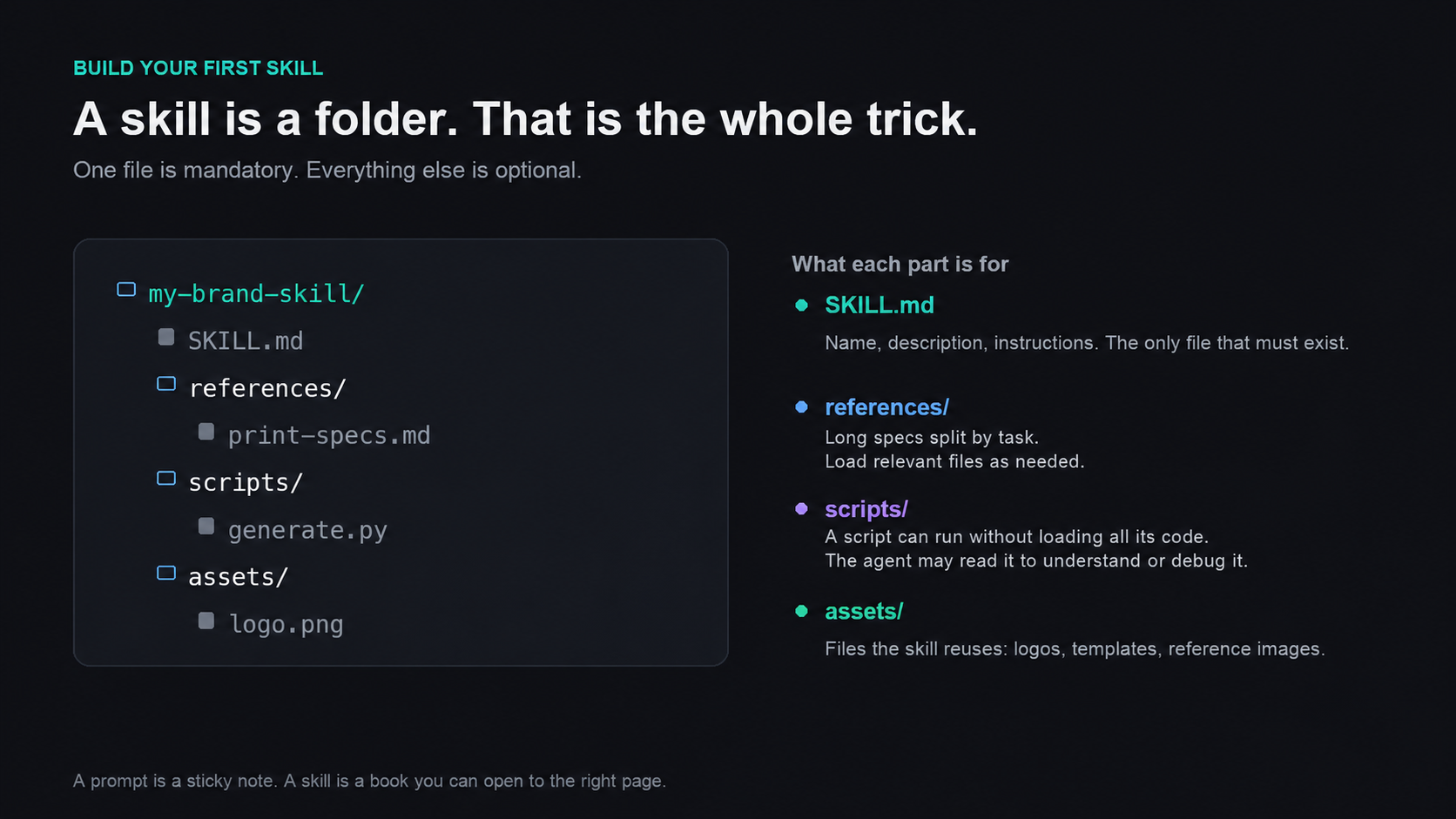
SKILL.md defines the skill; supporting files add detail, code and reusable assets.
View full-size illustration
How do they work together? Through three layers of progressive disclosure:
- Metadata: A short catalog describes the skills available to the agent.
- Instructions: The skill's instructions load when it is activated, either by the agent or explicitly by the user.
- Resources: Reference documents, scripts and assets are used as needed. Executing a script needn't load all its code, but its use can still consume context.
Don't Want to Write It by Hand? Use a Skill to Make a Skill
Writing Markdown and scripts can sound like a lot. A skill-creation workflow can also build the restaurant example: an interactive generator asks questions and helps you work out the requirements.
That conversation can use choices you select or answers in plain language, adjusting the questions to the task rather than following a fixed questionnaire. Once the plan is agreed, the generator can draft the files and suggest examples to test.
You can still open the documents and change them by hand. They are instructions, after all.
Clear output requirements, a method, a set of standards or a process give the generator something concrete to turn into a custom skill.
You Don't Need a Huge Collection
There are ready-made skills in collections and repositories too: workflows for presentations, documents, spreadsheets and PDFs, for example. With the right host and dependencies, they can help turn a messy table into an organized one. A frontend-design skill can also give the same page a different direction from an unconstrained request.
But you don't need to install a mountain of things you'll never use. A game character can get a lot done with four abilities. Q, W, E, R: enough to take on the whole match.
The useful work is to refine a few frequent tasks into skills with the outputs you want, especially where you already have a method, clear requirements and experience of what works.
- Write a weekly report? Make a skill that interviews you, then drafts the report.
- Prepare lessons? Make one that takes a topic and produces teaching materials, exercises and slides.
- Illustrate articles regularly? Make one that takes an article and follows your visual style.
- Review contracts repeatedly? Make one that applies your review rules and adds comments.
Most people don't need to become skill developers. Start by handing over a small skill you already understand, and let the AI take on the repetitive part.