
Ten AI Repositories on GitHub, Sorted by the Gap They Fill
Contents
Source code you can inspect is a useful starting point. Getting a repository working still takes installation, configuration, and an understanding of what runs where. Some projects also offer paid services or use models that cost money to run.
“What can this project do?” and “Which step in my work would it replace?” are different questions. The README can help with the first. The second takes a look at your own workflow.
These ten repositories fit into seven useful groups. Start with the gap you have, then inspect the relevant project and its requirements. This is a capability map, rather than a popularity ranking.
1. Remembering the Previous Session
thedotmack/claude-mem captures tool-use observations, creates summaries, and makes material available for later sessions to retrieve. Its documented architecture includes a local worker, SQLite storage, and Chroma-based search. The memory observer can use different model providers, and optional Cloud Sync can move stored material to a hosted service. Local storage doesn't make every processing step local; review those settings and your client's integration path.
The gap is specific: a new session starts, and you find yourself explaining the project layout and the last task again. A memory workflow can carry useful material forward, provided it captured the right information and the next session actually retrieves it.
2. Following an Engineering Process
There are two approaches here: guidance for doing the work and constraints on how much to change.
mattpocock/skills provides small, composable engineering skills. The collection includes requirements questioning, specification work, TDD, and debugging. The files are meant to be adapted, and the repository gives different installation routes for supported agents. Choose the workflow you need rather than treating the collection as one mandatory process.
multica-ai/andrej-karpathy-skills centers on four principles: Think Before Coding, Simplicity First, Surgical Changes, and Goal-Driven Execution. It is published by multica-ai as a third-party project inspired by Karpathy's observations. The repository describes a CLAUDE.md approach and a skill form. Its reuse license wasn't established in this review, so don't assume it is MIT-licensed merely because the file is public.
One addresses the steps of a workflow; the other emphasizes assumptions, scope, and restraint. Check how either would interact with your existing instructions. Installing both doesn't guarantee that their requirements will fit together.
3. Managing Several Agents as a Team
paperclipai/paperclip is an orchestration platform with a Node.js server and React interface. Its documented features include agent roles, task assignment, budgets, approvals, and goal tracking. You supply the agents and choose their model or harness connections. Self-hosting the management service doesn't make those connected models local or remove their usage costs.
Preserving one agent's context and deciding which agent owns which task are different jobs. Paperclip addresses the coordination side: assignments, responsibilities, spending, and progress. Your approval boundaries still need to be set for the work those agents perform.
4. Producing Files Someone Can Keep Editing
hugohe3/ppt-master provides an agent workflow for producing native PowerPoint files from source material such as documents. Its output uses PowerPoint objects, and the project documents templates, chart and table options, animation, and narration workflows. Check the resulting deck's objects and layout before handing it over; not every output mode represents a chart in the same way. The workflow needs its documented Python environment and agent setup, and can use external model, image, or voice services with their own data flows and costs.
cathrynlavery/diagram-design describes 45 diagram types and produces a self-contained HTML file with inline SVG. Its instructions include brand styling and a defined visual approach. You can edit the SVG as code, but the result isn't a native diagram canvas with boxes you can simply drag around. The maintainer also notes that model choice affects the output and repeated generation can change the layout.
The practical question is what kind of edit the next person needs to make. Native PowerPoint objects and HTML/SVG each leave something inspectable, but they offer different editing experiences. Ask what happens when someone needs to change a label next week, rather than stopping at whether the first render looks good.
5. Inspecting How Software Works
morluto/rea connects an agent—or a terminal user—to tools for inspecting native binaries, JavaScript and Electron applications, .NET assemblies, Android APKs, and websites. Its MCP and CLI components run analysis locally. Target support depends on the relevant backend and dependencies: native analysis can use supported disassemblers, for example, while APK analysis has its own tooling requirements.
The documented approach returns evidence and limitations with the analysis. That is useful when investigating software behavior, but it doesn't guarantee complete decompilation or a correct conclusion. Also inspect the calling agent's configuration: a local analysis tool can return findings to an agent that uses an external model.
6. Adopting a Larger Engineering Harness
affaan-m/ECC packages skills, specialized agents, hooks, rules, memory workflows, and security scanning. Its README distinguishes the MIT-licensed repository from the optional hosted ECC Pro service. It also publishes a support matrix: native integration in one host and a more limited adapter in another don't provide identical capabilities.
This is a larger configuration decision than adding one skill. Inspect what the selected setup enables, which hooks run, and what the supported host can actually do. A broad collection can supply conventions for an established agent workflow; installing it doesn't by itself validate the process or make the resulting code secure.
7. Identifying the Parts That Can Run Locally
This final group is a deployment question that cuts across the functional groups. Name the local component, then trace the rest of the path.
Claude-mem can keep memory records in local stores while an observer uses a model service. REA runs analysis locally while the calling agent has its own data path. Paperclip can host coordination locally while connected agents call outside providers. “Runs on my machine” needs a component attached to it.
debpalash/VoiceStudio is a voice-production project whose maintainer lists cloning, voice design, dubbing, dictation, transcription, and narration, with a claim of 646 languages. The repository documents local engine choices, a local API, and MCP. Actual language support and performance depend on the selected engine and hardware. Its AGPL-3.0 desktop application is distinct from optional Pro offerings and a Cloud service described as not yet available. Those are different deployment and licensing paths, not evidence that every mode is offline.
bilawalsidhu/gods-eye-view presents public signals on a browser-based 3D globe, including aircraft, ships, satellites, cameras, weather, and fire data. It can run locally, but fetches external maps and data feeds; some features use provider keys, and voice control can involve an external AI service. The README also distinguishes live feeds from simulated traffic and estimated scene details. Treat it as a visualization of its stated sources, not an offline view of everything happening on Earth.
If material must stay on the machine, trace collection, storage, analysis, model calls, synchronization, and exports. A local server or database is one part of that answer.
Check the License Separately
The repository license files checked for this article identify MIT for mattpocock/skills, Paperclip, ppt-master, diagram-design, REA, ECC, and gods-eye-view; Apache-2.0 for claude-mem; and AGPL-3.0 for VoiceStudio. The license for multica-ai/andrej-karpathy-skills remains unclear from the material checked.
Read the terms for the version and components you plan to use. Public source code, a repository license, model access, and an optional hosted product are separate things. A permissive license also doesn't mean there are no conditions to follow.
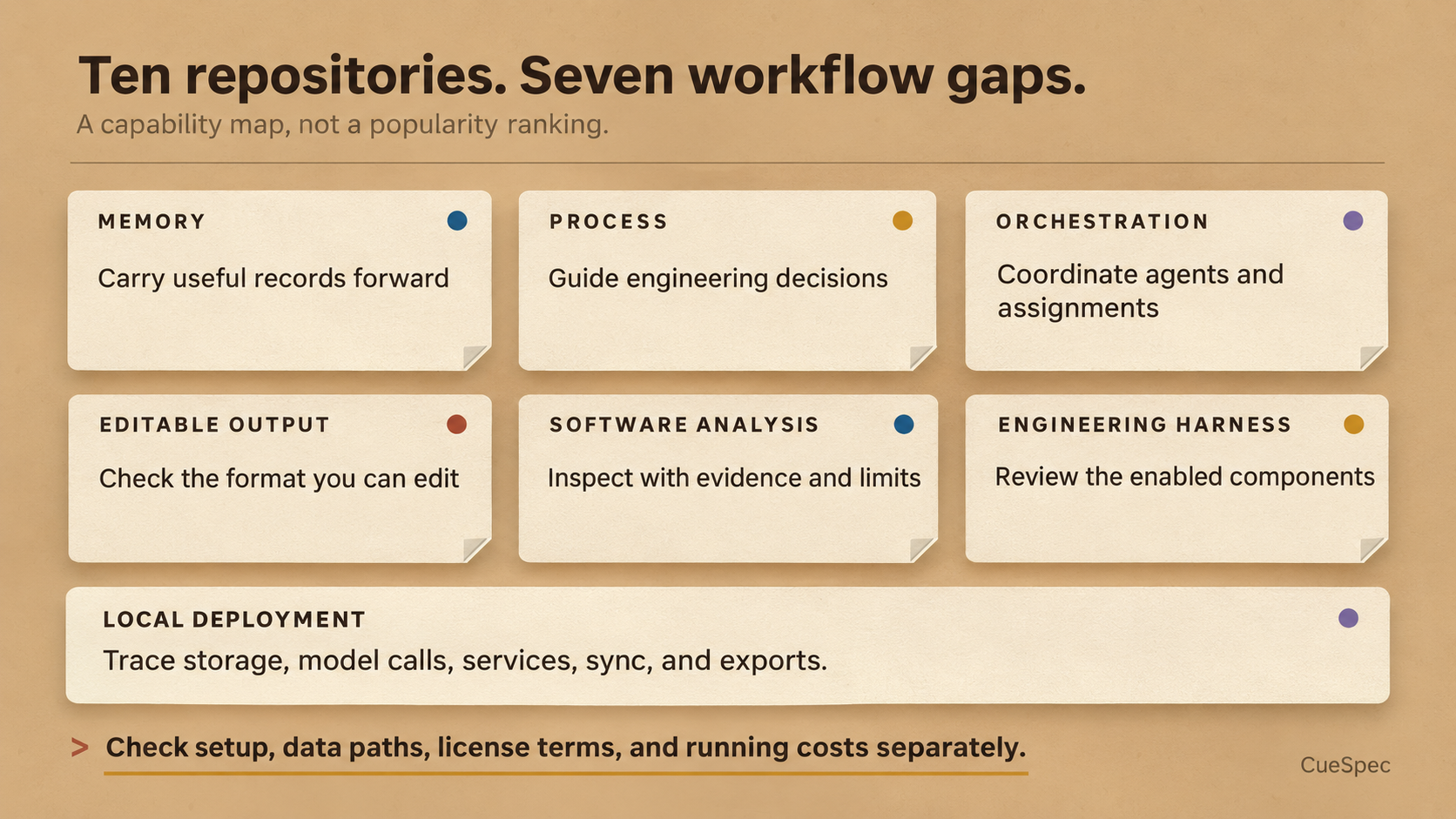
Match the workflow gap, then check setup, data paths, license terms, and running costs separately.
View full-size illustration
How to Choose
Read the project's intended use and setup requirements against a real task you have. Check the host, dependencies, model or service choices, expected output, and data path before committing an afternoon to installation.
You are taking on setup and maintenance even when there is no software purchase. Be able to answer two questions: where will this run, and which step will it replace? If the second answer is still vague, ten installed repositories leave you with the same gap and more software to maintain.