
Pi's Four Default Tools and the Tradeoffs of a Minimal Coding Agent
Contents
1. What Does “Hello” Cost in Tokens?
Even a greeting reaches a coding model with more than the word you typed. System instructions, tool definitions, project context, and conversation history all contribute to the request. How much they add depends on your configuration and model.
Pi starts with four default tools, read, write, edit, and bash. That gives it a small working core for inspecting files, changing code, and running commands. The complete request grows with the context and capabilities you load.
Harness design can affect task costs. In a July 8, 2026 study of real coding tasks on its multi-million-line codebase, Databricks compared harnesses while holding the model and thinking effort fixed. It reported cost differences exceeding twofold in some cases with similar quality on its held-out tests. Pi sent roughly a third as much context per turn in that study. Composio's separate harness research covers application and MCP tool-use tasks, with rankings that changed between models. These comparisons give you reasons to test the model-and-harness combination on the work you actually do. Databricks study, Composio research
2. After Installation, Learn to Read the Footer
Start with the current instructions at Pi's official site. Its npm route requires Node.js 22.19.0 or newer and uses npm install -g --ignore-scripts @earendil-works/pi-coding-agent. Check pi --version, then run pi from the project folder. Official installers are also available for Windows, macOS, and Linux.
Use /login to connect through a method supported by your provider, such as a supported subscription or an API key. Use /model or Ctrl+L to select a model. Shift+Tab cycles through the thinking levels that model supports.
Spend a moment on the footer. It shows information about your folder, session, model, context usage, and accumulated usage and cost. Use /session to inspect session statistics. Read the labels in your current interface and treat cost displays as usage estimates to compare with the provider's billing terms.
For a first exercise, imagine building a React website for a pet-grooming business. Describe the page you want, the services it should show, and how visitors should use it. Shift+Enter adds a line to a prompt. Ctrl+G opens your configured external editor for a longer request. Run /hotkeys to see the shortcuts active in your terminal.
3. Changing Direction or Queuing the Next Task
Suppose Pi is working on the frontend and backend, and you see it choosing Express. You want Next.js with SQLite. Type that correction and send it with Enter as a steering message. Pi waits for the current assistant response and its tool calls to finish, then uses your message to guide the next response.
A follow-up waits until the current task finishes. The default shortcut is Alt+Enter, or Ctrl+Q on Windows and WSL. To bring queued messages back into the editor, use Alt+Up, or Alt+Q on Windows and WSL. Check /hotkeys for your actual bindings and terminal setup.
The distinction comes from when each message enters the agent loop. The working loop asks the model for a response, executes its tool calls, and returns the results for further work. Steering enters after an assistant turn. Follow-ups wait outside that ongoing work and can start another round once it finishes.
4. Four Tools at the Core
Read, write, edit, and run a command. The last tool does a lot of work. Through bash, the agent can use available programs such as find for files, grep for text, and ls for directory listings.
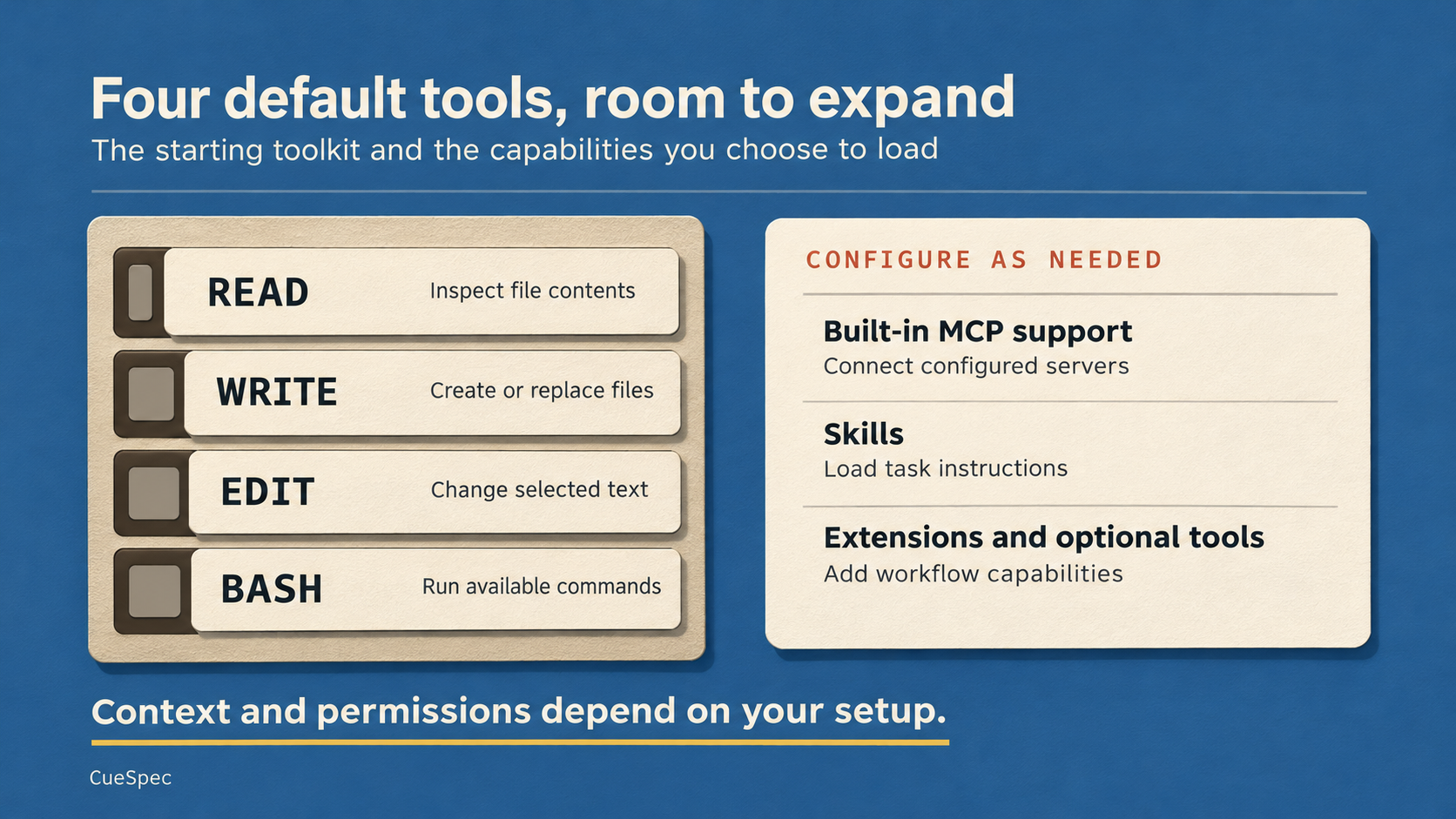
Pi starts with four default tools. Configure additional capabilities for the project, and check the context and permissions of the resulting setup.
View full-size illustration
The configurable product extends beyond those defaults. Current Pi includes MCP support and can expose additional built-in tools and extensions. Skills add task-specific instructions. Workflows such as planning or specialist subagents can be added where needed. You choose how far to expand that initial setup and which capabilities the model sees.
5. Add Capabilities Where the Project Needs Them
Perhaps a project needs web search, parallel reviewers, a plan you can edit before implementation, or an iterative run toward a goal. Look for an identifiable package or extension that provides the capability, then check its source, requirements, and compatibility. Each addition gives you something else to configure and maintain.
Pi packages can come from npm, Git, or a local path through pi install. Adding -l or --local records the package in the project's .pi/settings.json. Personal package declarations live in ~/.pi/agent/settings.json. That lets you keep a project-specific capability scoped to the project that needs it. Extensions can register tools, commands, event handlers, and interface elements. Skills load their full instructions when needed.
For MCP, current Pi reads personal servers from ~/.pi/agent/mcp.json and project servers from .pi/mcp.json. Configure a specific server with its required connection details and credentials. Use /mcp to inspect the resulting connection and available tools. A map integration, for example, would depend on the particular server and the services it actually provides.
Pi supports project skills under .agents/skills and personal skills under ~/.agents/skills. A browser workflow needs its browser tools and dependencies available. A document-conversion skill needs the programs its instructions call. If you prefer a graphical interface, check the particular community project's supported Pi version and features before adopting it.
6. A Session Has Its Own Conversation State
A session records a continuing conversation. /new starts another one. After leaving Pi, pi --continue resumes the most recent session for the current folder, while pi --resume opens the picker. You can also use /resume inside Pi. /tree lets you return to a conversation entry and branch from it. Files retain their current contents, so inspect the working diff, preserve work you want, and use version control to restore selected files when needed. Pi can summarize the branch you leave to carry relevant information forward.
/compact reduces the history sent to the model by summarizing earlier material while retaining recent messages. The original session entries remain available. For a distinct new task, save a useful handoff and consider /new. For continuing work that still needs the conversation's decisions, compaction may be useful. Choose according to the context the next task requires.
7. Permissions Come From How You Run Pi
Pi runs with the operating-system permissions of the account that starts it. Project trust controls which project resources load. After loading, enabled tools operate with the process's permissions, and Pi generally proceeds without asking before every tool call.
That makes the surrounding environment important. You can run it under a more restricted account or inside a container or virtual machine, controlling which files, credentials, and network services are available. Extensions and child processes also need to fit within that boundary. A confirmation extension can add review points for selected actions, with its coverage depending on how it is implemented.
8. You Can Ask Pi to Write an Extension
Pi documents its extension interface, so you can ask it to develop a TypeScript extension for a particular need. As an example, you might request a weather widget above the editor, using an external service to estimate a location from an IP address and retrieve a forecast. Review the service calls and generated code, place a project extension under .pi/extensions, and use /reload to load changes. Other possible requests include checking file access involving .env or asking for confirmation before a deletion command. Test what the extension intercepts, including the command paths your workflow uses.
Project extensions and personal extensions have different scopes. Personal extensions under ~/.pi/agent/extensions can apply across projects. Review what you are making available at that scope before loading it.
The implementation is divided into packages for model access, the agent loop, the coding-agent application, and the terminal interface. Pi also offers a TypeScript SDK. Its createAgentSession() entry point from @earendil-works/pi-coding-agent creates a session using the configured working environment and resources. That gives developers a way to build on the same session and tool mechanisms used by the terminal application.