
7 Skills Worth Installing: Put Them Straight to Work
Contents
Skills are everywhere in 2026. Some of us are still getting the hang of borrowing a decent prompt, and there's already a skill for almost everything.
There are skills for animated presentations, editing AI-sounding prose, designing interfaces and even chatting with ebooks. And they've started moving into management: managers that refine other skills, dispatchers that call them, skills that tell other skills how to work. There are whole marketplaces for the things.
That leaves a familiar problem: a bookmark folder full of skills that sit unused after installation. Which ones are useful enough to earn their place?
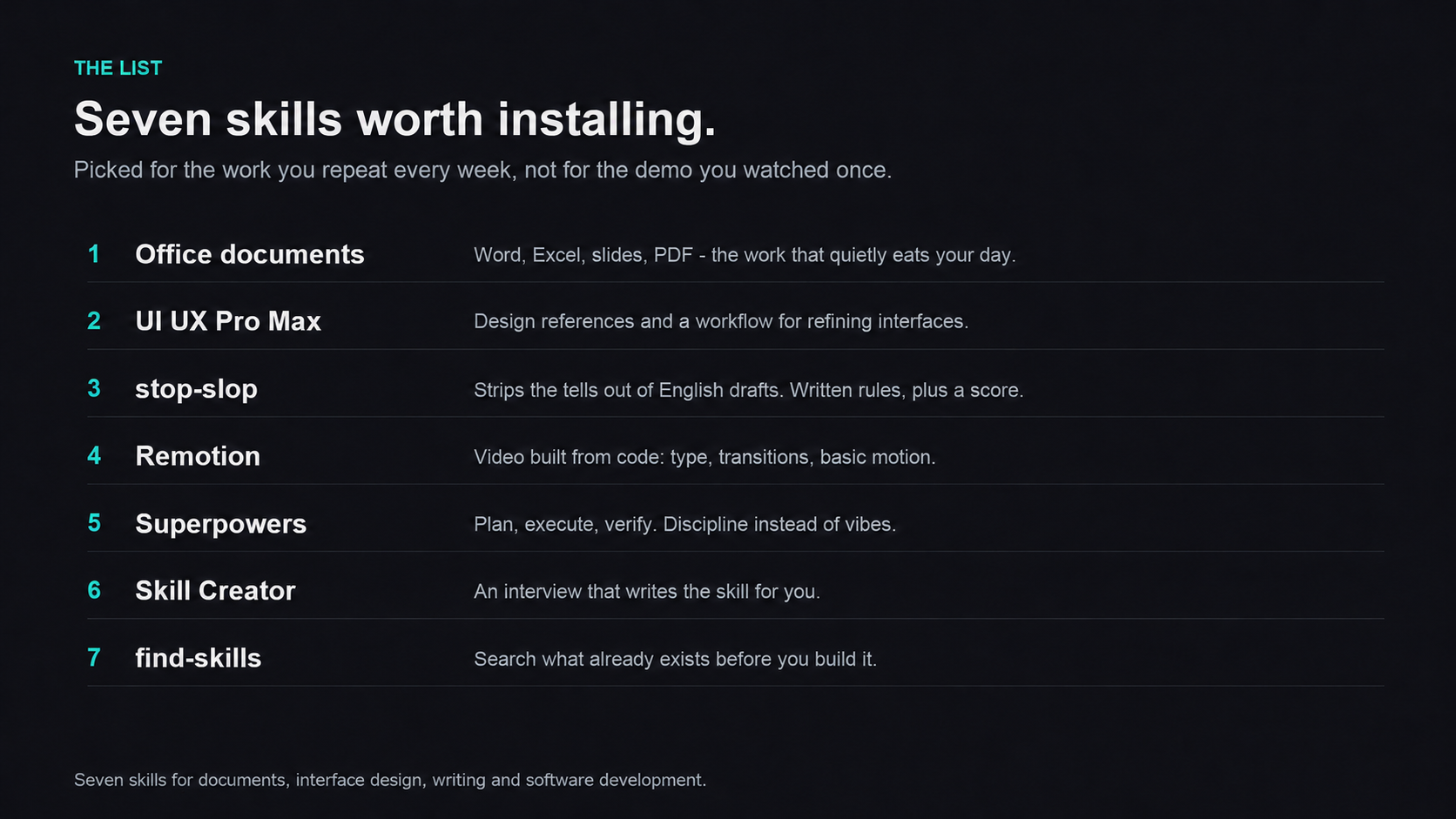
These seven agent skills cover everyday work with documents, interface design, writing and software development. Each has an identifiable project and a concrete job to start with: a briefing, a page to improve, a draft to edit or a development task to work through. Pick the one that matches work you already need to do. Installation and ways to see what you've installed are at the end.
First, What's a Skill?
A skill packages a practiced way of doing a job into instructions your AI can use when it needs them.
How is that different from a prompt?
A prompt can be a one-off note. A skill can carry a repeatable workflow, constraints, example templates, scripts and instructions for using tools. A supporting agent can select it again when a matching task comes up, or you can ask for it by name.
The terminology doesn't have to be a hurdle. Whether someone calls it a prompt, a skill or MCP, the useful question is what it helps you do.
Match a skill to a recurring task.
View full-size illustration
1. The Four Office Document Skills
Anthropic's document skills cover Word, PowerPoint, Excel and PDF files. With the required tools available, they guide an agent through reading, creating and editing those formats. Their code is source-available under the repository's document-skill terms.
Here's a practical task: take a dense, 19-page research paper and ask for a one-page briefing on its research question, main contribution and key conclusions. Then use that briefing to build an eight-slide presentation. The same material becomes much easier to present.
2. UI UX Pro Max
We've all seen AI return to the same few design templates. The blue-purple gradient has had a good run.
UI UX Pro Max combines a design reference library with a workflow: palettes, typefaces, layouts, components and usability guidance. Given a website brief, it can guide an agent through a design system and the details that follow, from spacing and hierarchy to interactions. Its search scripts require Python; the guidance gives the agent something more specific to work from than a request to “make it look good.”
Take an “Office Joke Generator” page that comes out with the familiar AI look. Ask the agent to use this skill to refine the overall design. The aim is a more considered visual finish for that same page.
3. stop-slop: Edit the AI Sound Out of English Prose
If you're tired of AI's sudden em dashes and odd metaphors, this is a skill to try.
It's called stop-slop, by Hardik Pandya, in the hardikpandya/stop-slop GitHub repository, under the MIT license. The project contains a main instruction file and three references: phrases, structures and before-and-after examples. An agent can consult the references as needed; how much enters its context depends on the host and how you load them.
It targets several kinds of writing habits, beyond individual words:
- Phrases: throat-clearing openings, emphasis crutches, adverbs, vague claims and commentary about the writing itself.
- Structures: formulaic binary contrasts, lists of negatives, dramatic fragments, distant narration, human actions assigned to inanimate things and passive constructions.
- Sentence rules: its preferences include active voice, no em dashes and no sentences beginning with a Wh- word. These are this project's editing rules; using one of those forms doesn't establish who wrote a sentence.
It also supplies a self-rating rubric: directness, rhythm, trust in the reader, authenticity and density, each scored from 1 to 10. A total below 35 out of 50 calls for revision. That turns a vague editing preference into a repeatable review, though the score remains a self-assessment.
For a practical writing task, you could have AI introduce a popular new community, then ask it to revise that same draft using stop-slop's phrase and structure rules.
4. Remotion
Remotion's official agent skills guide the creation of videos with code. Give the agent a script and a visual direction for something like a product launch, and it can build a renderable Remotion project with typography, transitions and basic animation.
A phone-launch animation is one task to try: a short prompt supplies the starting brief, and more polished results take time spent refining the details.
5. Superpowers
Superpowers, from the obra/superpowers project, applies skills to the broader software-development process.
It suits people who have an idea without having worked out every part of it. Think of a product and technical partner: clarify the need, narrow the scope, turn the idea into a plan and then work through it in manageable pieces.
It bundles skills for requirements, task planning, test-driven development and other parts of the development workflow. In Claude Code, it's available as a plugin: install it from the official marketplace, or register the project's marketplace and install it from there. Other clients have their own installation routes.
Suppose you want a “Weekly Work Summary” tool: enter your role and what you did this week, and it organizes scattered notes into progress, open questions and a plan for next week. The workflow can walk you through the details: what form the tool should take, how you'd like to enter your work and which implementation approach you prefer. The design gets agreed before development begins.
6. Skill Creator
Anthropic's official meta-skill: a skill for making skills.
You find an open-source project or a useful workflow someone has shared and want to make it reusable. How should the skill be organized? What rules belong in it? Skill Creator helps develop the name, description, use cases, examples and boundaries, then turns them into a skill you can install and reuse.
Take Vercel Labs' agent-browser, a browser-automation tool that gives an agent a way to interact with webpages. Automating forms, data collection or a complicated browser task can otherwise mean writing and maintaining a lot of element-location code. agent-browser already includes a companion skill; Skill Creator could help package your own recurring workflow around it, so the agent has instructions to reuse next time.
7. find-skills
Vercel's skill-discovery and installation helper. Vercel is the cloud platform many developers use to build and deploy websites.
Enter a keyword or describe what you need, and find-skills guides the agent through searching the open skills ecosystem. It can return matching packages with installation commands.
For example, when it's time for your year-end work review, ask whether there's a skill that can help. With find-skills available, the agent can search and present a few candidates, each with a short description and an installation command, so you can choose.
How to Install Skills and See What You Have
Try installing one. For UI UX Pro Max, give Claude Code, Codex or another supported coding agent the project's website and ask, “Help me install this skill.” The installation route and dependencies depend on the client; the project's instructions cover the supported options.
Reload or restart if your client's installation instructions require it. Then ask, “Use this skill to improve this website.” You can invoke it explicitly instead of waiting for the agent to choose it.
Forgotten what you've installed? In Codex CLI or its IDE extension, /skills opens the skill selector. Other clients have their own skill lists and commands; when you've installed through Vercel's Skills CLI, npx skills list lists those installed skills.