
Put the Requirements on a Page, Then Let AI Build
Contents
Imagine giving the same feature request to an AI coding assistant in two ways. In the first, it produces a to-do list and starts working. In the second, it drafts requirements, a design, and implementation tasks for you to review before code changes begin. The second approach gives you an earlier chance to catch a mismatch between your idea and its interpretation.
That is the attraction of spec-driven development for AI coding. Four questions help make sense of it. What is it, why use it, how does it work, and when is the extra process worth skipping?
1. The Important Step Comes in the Middle
For a worked example, start with an empty project and a rough request. Build a store with a homepage, product listings, and a shopping cart. Let someone add products, put them in the cart, and place an order. Ask the assistant to draft the requirements first.
Now read them. Does its interpretation match yours? Where has it filled a gap with a decision you would change? Discuss those points and have it revise the document. Add a requirement and check that the revision actually includes it.
Once you agree on the scope, review the proposed design and task list. Then authorize implementation and follow the task updates as work proceeds. Make those review points part of your instructions and working habits.
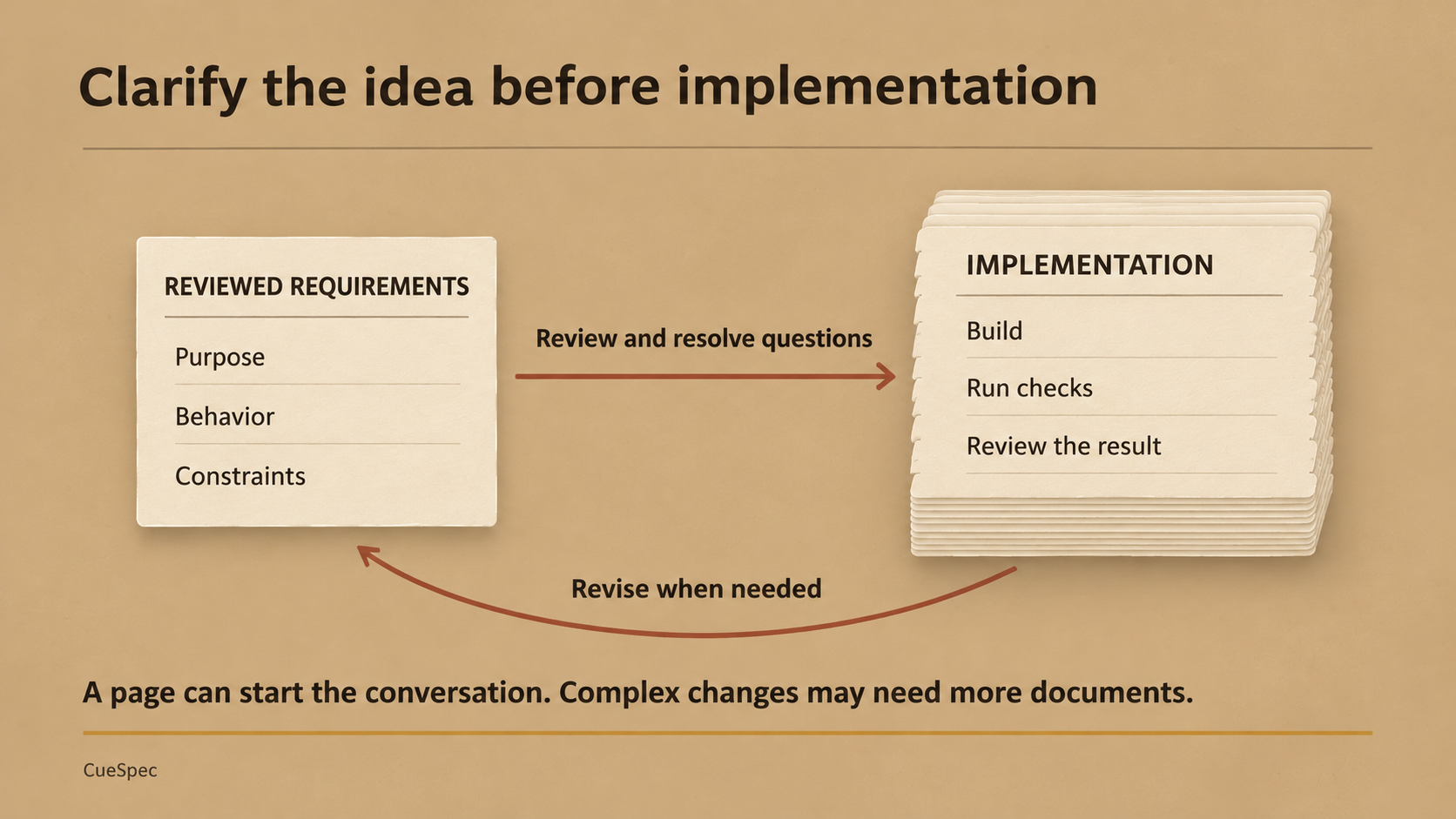
Review the requirements before implementation, and revise them when the work reveals a new question. Complex changes may need several planning documents.
View full-size illustration
The sequence is a request, the assistant's interpretation, a conversation to resolve questions, reviewed planning documents, implementation, and an updated record of the tasks. OpenSpec can produce several files along that route. A page is a useful starting size for the idea you need to clarify.
2. Clarification Gives the Documents Their Purpose
You can already write documents yourself. What do you gain by having an assistant draft more of them?
You gain an interpretation you can examine before it becomes code. If a requirement is already clear, you may go straight to a proposal. When it is fuzzy, the conversation matters. Check whether the workflow gives you a practical way to question assumptions and carry corrections into the specification. Generating a stack of documents and ignoring their contents leaves those assumptions in place.
3. Three Ways to Describe the Same Request
The first is a sentence. “Build an order-creation feature.” The assistant examines the code and context, then works out much of the behavior itself. You have left it a lot to decide.
The second spells out the process. Describe the first action, the conditions to check, and the branches to follow. You can also identify existing code to reuse. In a hypothetical project, that might mean getting product information through goodsService.getProduct instead of creating another lookup method. Write the business flow and implementation constraints in your own words. On Mac, CueSpec can help you capture that explanation as a local editable voice draft, review it, and explicitly send it to the selected Codex conversation.
Both approaches depend on the context available to the assistant, including the prompt, project instructions, and relevant files.
The third uses a specification workflow. Your initial request can be short or detailed, but you examine the resulting requirements, design decisions, and tasks before implementation. This asks something of you too. You need to understand the documents well enough to spot a wrong assumption and ask for a correction. Context and engineering judgment still matter.
Planning is especially valuable when several features interact. An explicit plan and smaller tasks help you see which decisions you have made and which remain open. Changes discovered during implementation can feed back into those documents.
4. Start With Three Everyday Operations
OpenSpec is an open-source tool for organizing this work inside supported AI coding assistants. Its day-to-day use can start with a few operations, without learning an entire software-design methodology first.
The working rhythm is to describe a change, clarify the questions, implement the reviewed tasks, and preserve the completed change. You can return to the planning documents when implementation uncovers a problem.
For the npm installation route, the version checked for this article is OpenSpec 1.16.1, which requires Node.js 22.12.0 or newer. In a terminal, install it with npm install -g @fission-ai/openspec@1.16.1, check openspec --version, then run openspec init from the project root. The official installation guide also offers other installation routes.
Initialization configures your selected assistant and creates the OpenSpec project structure. Main specifications live under openspec/specs. Individual changes live under openspec/changes. Project configuration and the selected tool's generated skills or command files provide the integration.
Those project documents can support work across compatible assistants. Configure the destination tool and check its setup instructions when switching, then confirm it has read the right project files.
For the following chat operations, use Claude Code's spelling. Type them in the assistant's chat, with a descriptive change name such as add-product-groups.
/opsx:propose add-product-groupscreates the change and planning documents./opsx:apply add-product-groupsstarts implementation against that change's tasks./opsx:archive add-product-groupshandles the completed change's archive workflow after you have checked the result.
When the idea needs discussion first, start with /opsx:explore. OpenSpec also has operations for revising plans and syncing specifications. Other assistants use their own generated invocation syntax, so follow the hint printed by openspec init for yours.
5. The Archive Becomes a Useful Project Record
Completed change documents are useful during review and when revisiting a feature later. Suppose an order process grows from three steps to four. Describe that change against the existing specification, review the revised behavior, and sync the accepted delta into the main specification. Preserve the earlier change history.
OpenSpec separates those records. openspec/specs contains the synced specifications. Work in progress sits in changes/<name>, and archived changes go under changes/archive/YYYY-MM-DD-<name>. The chat archive workflow checks the change and can offer specification sync when needed. Read its sync result and your project's test results as you close the work.
Use the integration generated for your assistant to invoke the workflow deliberately. Check that the command or skill loaded and that it is operating on the intended change.
6. In Practice, the Questions Do Much of the Work
Return to the store and imagine adding product groups. Start an exploratory conversation in the configured assistant and ask it to inspect the existing specifications. Settle what defines a group before requesting the proposal.
Then review the change folder. The proposal explains the purpose and affected areas. The specifications describe the behavior and scenarios. Work through querying, filtering, calculations, and the intended mobile layout. These are places where a seemingly small grouping feature can hide decisions.
Review the technical design and tasks required by the selected workflow. The schema determines the document structure, and the project's complexity determines how much detail is useful. Once the plan is ready, invoke apply with the change name. Check the implementation and run the project's relevant checks. If the plan changes, revise it along with the code.
7. When to Keep the Process Lighter
The type of change gives you a starting point for deciding how much specification work it needs.
- New features, architecture changes, and interface changes often benefit from an explicit proposal, especially when they affect several parts of a system.
- A bug fix that changes intended behavior, such as the way an order price is calculated, deserves a review of that behavior and its specification.
- A narrow visual adjustment may need only a clear request and focused checks. Consider whether it affects accessibility or layout behavior before treating it as trivial.
Ask how much of the system the change affects and whether it changes an important direction for a module. Then apply the project's conventions at that scale.
The benefit you can look for is visible alignment. You can trace a decision from a requirement into a task and check the result against it. AI coding still leaves you with thinking and design work. A specification gives that work somewhere to live.