
Uncle Bob's Three Stages for AI-Written Code: Make It Work, Make It Right, Make It a Habit
Contents
Robert C. Martin, known as Uncle Bob and the author of Clean Code, has an agent skill called ub-mode. It lays out a set of working rules for AI coding assistants.
A skill gives an agent instructions to follow when writing or changing code. The ub-mode README describes its approach as enforcement through deterministic quality gates. The useful distinction is between an agent deciding its work looks good and a tool calculating a result you can check. Turning that result into a mandatory gate still requires the tools to be installed, run, and connected to your acceptance process.
The repository also credits its starting point: portions of @poteto's poteto-mode / pstack rules, reduced and paired with separate checking tools. The approach is to trim the instructions and put measurable checks alongside them. Separate repositories make those tools available independently; they don't establish compatibility with every agent or project.
First Make It Work
The first stage names eight principles—Laziness Protocol, Foundational Thinking, TDD, Redesign From First Principles, Attack the Premise, Subtract Before You Add, Outcome-Oriented Execution, and Build the Lever—plus Architecture.
One way to read that list is in three groups.
First, think through the problem. Foundational Thinking, Attack the Premise, Subtract Before You Add, and Redesign From First Principles all push you to examine what you're building before piling on another fix. Check the assumptions, get the foundations right, and look for complexity you can remove.
Then, get to working behavior. TDD—test-driven development—starts with a failing test. Outcome-Oriented Execution asks for an end state you can check. Laziness Protocol favors the smallest edit that solves the problem. Build the Lever calls for a reusable tool when the work warrants one.
Architecture is already part of this first stage. Its five headings are Model the Domain, Boundary Discipline, Type System Discipline, Make Operations Idempotent, and Separate Before Serializing Shared State. The concerns include representing the domain, checking data at boundaries, using types, making repeated operations safe, and separating state that doesn't need to be shared. “Make it work” includes decisions about structure from the start.
Then Make It Right
The second stage has seven entries: three practices, three tools, and refactoring.
Fix Root Causes asks you to address the cause of a failure. Sequence Work into Verifiable Units breaks the job into pieces you can finish and check before starting the next. Test Behavior (Not Implementation) focuses tests on what a user can observe. That continues the first stage's testing discipline: establish what the code should do, then check that it does it.
Refactoring comes last in this list. The instruction is to pin down the behavior, change the structure, and prove the behavior stayed the same. It's a useful way to organize the work: get a reliable check before rearranging the code it protects.
Crapper, Dryer, Mutator: Three Tools, Three Kinds of Checks
These are companion repositories with tools that calculate results. Each gives the agent something more concrete to inspect than its own assessment of the code.
Crapper combines a function's cyclomatic complexity and test coverage into a CRAP score. The ub-mode policy calls for each function to score below 10. More complexity raises the score; poor coverage makes complex code score worse. That gives you a reason to simplify the function, improve its tests, or both. The threshold is this skill's policy, not a universal definition of good code.
Dryer looks for structurally similar code. The ub-mode policy calls for eliminating duplication ranked at 0.8 or above; that is a similarity score for code candidates, not a claim that a project's duplication percentage must be below 80%. Dryer's current default reporting threshold is 0.82. It compares structural fingerprints in supported languages and reports candidates for review. Similar shape is a reason to inspect two pieces of code, not an automatic instruction to combine them.
Mutator makes deliberate code changes and checks whether the tests detect them. Its results distinguish uncovered mutation sites, mutations the tests catch, and mutations that survive. A survivor may expose a weak assertion or a gap in coverage; it may also be an equivalent mutation that doesn't change observable behavior. It doesn't, by itself, prove that the code is unused. The skill's goals are to cover the uncovered, kill surviving mutants, and delete dead code, but deciding that code is dead takes further evidence.
The tools have different emphases: complexity and coverage, structural duplication, and tests' ability to detect changes. Their concerns overlap—coverage matters to both Crapper and Mutator—but they ask different questions about the same code.
Fewer Rules, Three Tools Alongside Them
The README's description of the rules as reduced is easy to overlook. The design starts by removing some instructions, then adds tools that produce measurable results.
That can make a review much firmer. A written rule asks the agent to follow a policy; a configured gate can reject work that fails it. To get that second behavior, you need the companion tools, support for the project's languages, the required tests and coverage inputs, and an actual step that checks the results and blocks acceptance. Copying a skill file doesn't install that machinery.
Practice
The final group is Keep a Log, Guard the Context Window, Worktree Cleanup, and Commit and Push in small ordered commits.
These rules help the work survive beyond the current session. A log preserves actions and reasons; a manageable context keeps the next step clear. Safe worktree cleanup and ordered commits help you locate changes and recover earlier work. They are habits to use throughout a task, even though the repository groups them at the end.
Why This Sequence Is Useful
Get working behavior, check and improve it, and keep the work recoverable. That progression gives a coding agent a practical way to organize a change. It doesn't require postponing architecture until the code runs, or waiting until the end to log work and commit. Architecture is explicitly in the first stage.
The practical difference comes when the instructions lead to checks that actually run. A skill can direct the agent to use Crapper, Dryer, and Mutator; a configured acceptance step can require their results. Those checks give you specific failures to investigate. Passing them still doesn't establish that every requirement is met or every bug is gone.
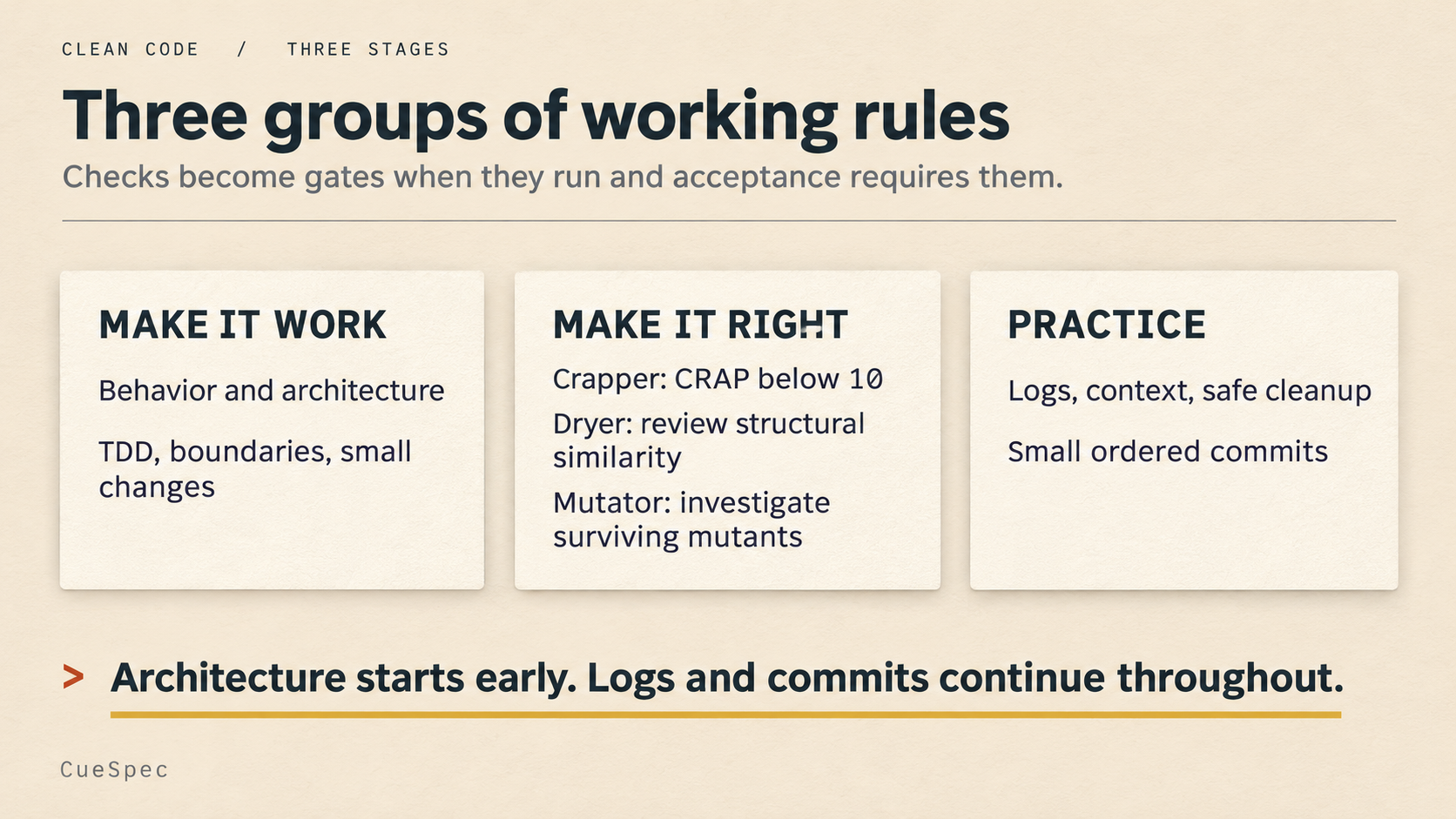
Architecture starts in the first group; logs and small commits can continue throughout. Tool results become gates only when the checks run and acceptance requires them.
View full-size illustration
How to Install It
Get SKILL.md from the unclebob/ub-mode repository and place it at ub-mode/SKILL.md within a skills directory your agent supports. The README gives examples for several agents and shows /ub-mode as an invocation. Check your agent's supported directory and invocation method rather than assuming the same command works everywhere. Set up the companion tools separately if you intend to use their checks.
Trim the rules, then add checks you can run. That brings the approach back to one of its own principles: Subtract Before You Add.