
Explore Two UI Directions Before Asking an Agent to Build Either
Drafted and reviewed using AI assistance.
On this page
Ask for two layouts that solve the same task with the same content. Change how information is grouped, aligned and connected to the next action. Then choose a direction for another design pass before asking an agent to implement it.
“Show me two options” leaves a lot unspecified. One option might add a search box, remove an awkward result or invent a photograph. You would then be comparing different features and content as well as layout. A useful exploration starts by fixing what both options must explain.
This guide works through a complete fictional room-selection screen. It includes two editable SVG originals, two complete exploration requests, a shared content map and a provisional choice. The drawings were written as AI-assisted editorial originals; they are static design proposals, not product screenshots, captured design-tool runs or usability results.
Start with the decision the screen must support
A coordinator needs a shared workroom for a four-person discussion on Sample day, 14:00–15:00 UTC. The whole hour must be available. A whiteboard is required; a display is optional. There is no flexibility in the hour for this exercise.
The person needs to compare three candidates, understand which fits and choose a room to review. Choosing is not booking. The initial screen has no room selected.
Here is the complete inventory for both directions:
| Room | Capacity | Selected hour | Equipment | Fit for this request | Proposed action |
|---|---|---|---|---|---|
| Cedar | 4 seats | Available | Whiteboard | Fits request | Choose Cedar |
| Birch | 6 seats | Unavailable | Whiteboard + display | Time unavailable | Cannot choose |
| Elm | 4 seats | Available | Display | No whiteboard | Cannot choose |
Keep the order Cedar, Birch, Elm, and show all three. Birch's larger capacity does not make its unavailable hour usable. Elm's availability does not supply a whiteboard. Cedar is the only eligible room under these fictional conditions.
Both screens use the title Choose a room, the summary 3 rooms; 1 fits this request, and the initial status No room selected. The next-step explanation is Choose a room to review. Nothing is booked.
These details make the exploration concrete. The agent does not have to invent what “suitable” means or decide whether a click reserves a room. If you describe the task aloud, keep this inventory and exact copy beside the request as text.
A public question about AI-assisted design describes an interest in static layouts, information hierarchy and multiple directions. It offers a useful question to work on here, without establishing any current tool integration or a general user preference.
Decide what may vary
For this task, the meaningful contrast is between comparing aligned fields and reading one complete room at a time. Keep the visual treatment similar so a new color or illustration does not become the main difference.
| Element | Keep fixed | Allow to vary |
|---|---|---|
| Task | Four people; one full hour; whiteboard required; review before booking | Nothing |
| Content | Same rooms, seats, availability, equipment, fit reasons and action labels | Nothing |
| Visibility | All three rooms and all supplied fields remain present | Where those fields sit |
| Order | Cedar, Birch, Elm | Nothing |
| Initial state | No selection | Nothing |
| Visual treatment | Same palette, type scale and action emphasis | Spacing and widths needed by the grouping |
| Wide structure | Same information | Aligned list columns or bounded room cards |
| Narrow structure | Same facts and reading order | Separated labeled entries or stacked cards |
Do not add filters, prices, ratings, room photos or other candidates during this comparison. Any could become useful later, but each would change what you are evaluating now. The static narrow arrangement also needs to keep equipment visible; hiding it would remove a requirement from one direction.
Direction A: align the comparison
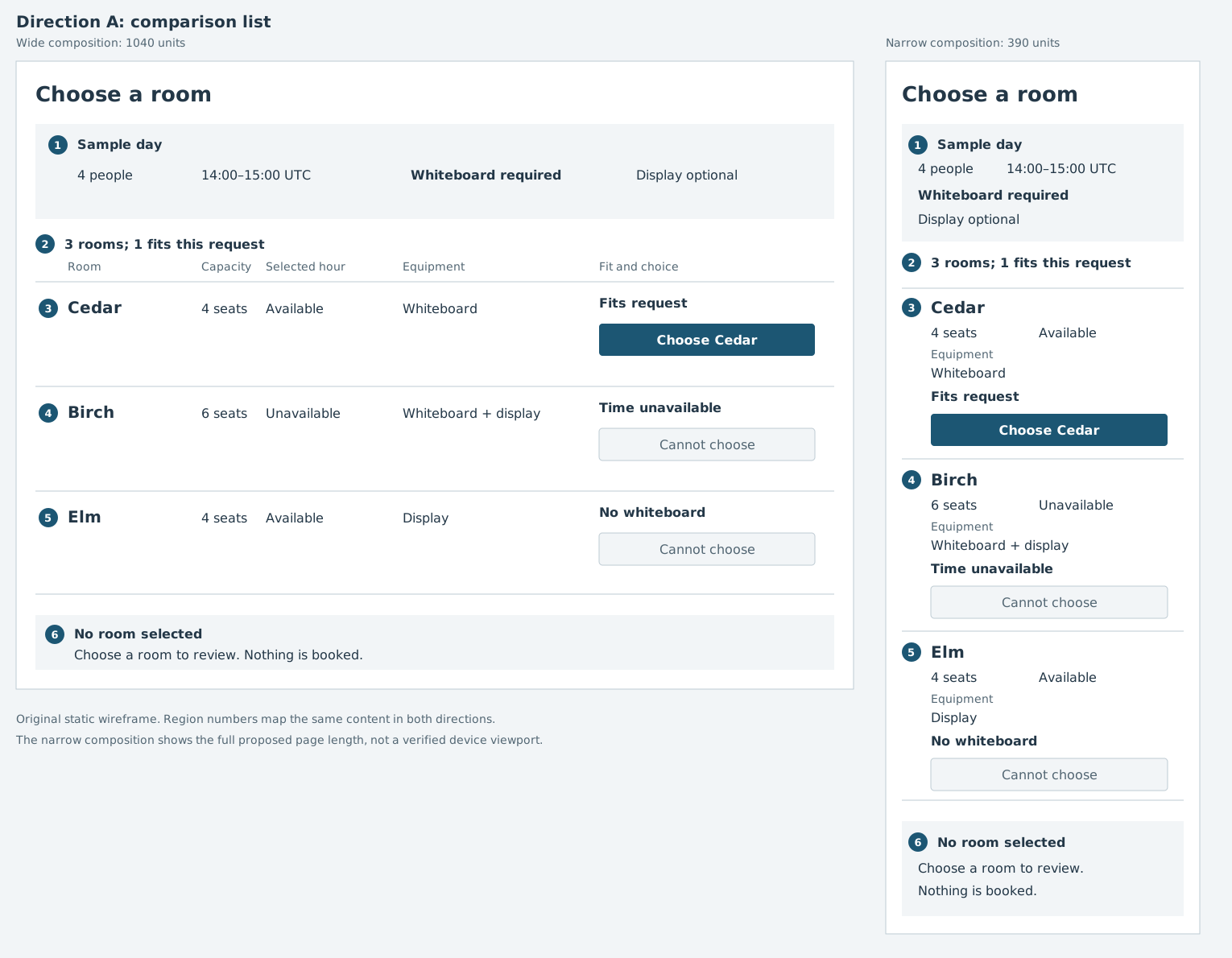
In the wide composition, each room has a row. Capacity, selected-hour availability, equipment and fit/action use matching column positions. A reader can look along one row or compare the same field across rooms.
The narrow composition replaces the columns with labeled facts in separated entries. It keeps each room's name, seats, availability, equipment, fit reason and action. It does not squeeze the desktop columns into a horizontal strip.
This direction makes the repeated-field comparison explicit. Its limitation is equally specific: the wide alignment does not survive unchanged on a narrow screen. The narrow entries need their own reading order and spacing.
Direction B: group a complete room
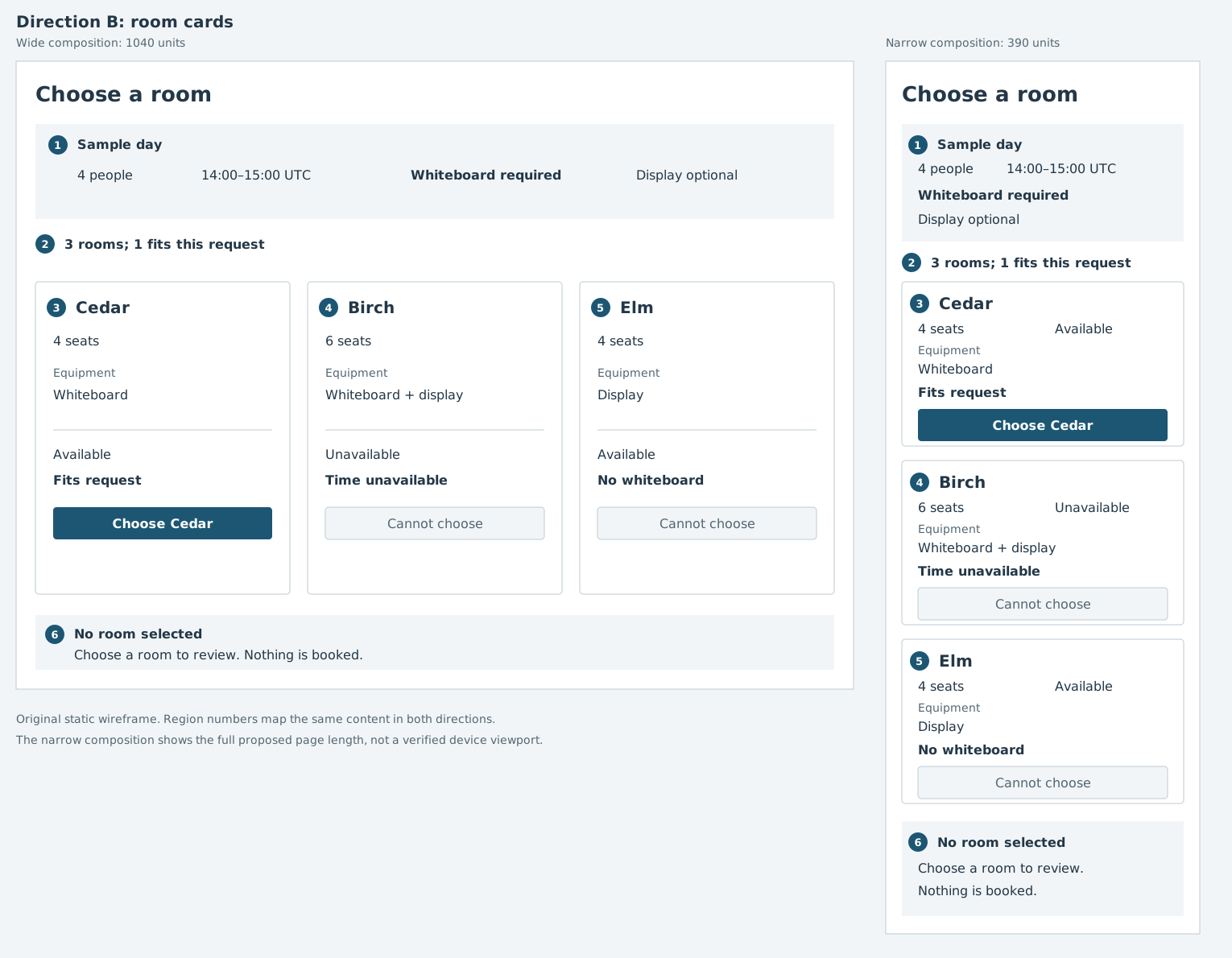
The wide composition gives each room a bounded card. Name, capacity and equipment form the room description; availability, fit and the local action form its decision area. The narrow composition stacks complete cards in the same order.
This direction keeps each candidate together. A room-specific detail would have an obvious place within its group, although this example does not invent extra details to fill the cards. Comparing a field across rooms means moving between card groups rather than following a shared column.
Both SVG files keep text and shapes editable. Each includes a 1040-unit-wide composition and a separate 390-unit-wide composition. These are drawings of two arrangements, not an implemented responsive page or a verified device view. Buttons are drawn controls; none performs an action.
Use the same map to discuss both
The numbers identify content regions, not a room ranking or a sequence the person must follow. Each number appears in the wide and narrow composition of both directions.
| Region | Content that must be preserved | What changes between directions |
|---|---|---|
| 1 | Sample day; 4 people; 14:00–15:00 UTC; Whiteboard required; Display optional | Shared request stays above results |
| 2 | 3 rooms; 1 fits this request | Shared summary stays above candidates |
| 3 | Cedar; 4 seats; Available; Whiteboard; Fits request; Choose Cedar | One list entry or one card |
| 4 | Birch; 6 seats; Unavailable; Whiteboard + display; Time unavailable; Cannot choose | One list entry or one card |
| 5 | Elm; 4 seats; Available; Display; No whiteboard; Cannot choose | One list entry or one card |
| 6 | No room selected; Choose a room to review. Nothing is booked. | Shared next-step explanation below candidates |
This map lets you catch content drift before debating appearance. If Birch becomes available in one option, correct the data. If Elm's missing whiteboard is hidden, restore the reason. Those are changes to the task information, not layout alternatives.
Give each direction a complete exploration request
The following requests are ready to adapt. They are authored examples, not prompts that were run. Each repeats the full task so it can be used independently.
Request A: comparison list
Explore a static room-selection screen before implementation.
A coordinator needs a room for 4 people on Sample day, 14:00–15:00 UTC.
The whole hour must be available, with no time flexibility.
A whiteboard is required; a display is optional.
No room is selected. Choosing a room leads to review, not booking.

Keep these three candidates in this order and show every field:
Cedar: 4 seats; Available; Whiteboard; Fits request; Choose Cedar.
Birch: 6 seats; Unavailable; Whiteboard + display; Time unavailable;
       Cannot choose.
Elm: 4 seats; Available; Display; No whiteboard; Cannot choose.
Only Cedar's action is available in the proposed design.

Exact shared copy:
Choose a room
Sample day
4 people
14:00–15:00 UTC
Whiteboard required
Display optional
3 rooms; 1 fits this request
No room selected
Choose a room to review. Nothing is booked.

Direction A: align room, capacity, selected hour, equipment and fit/action
in a wide comparison list. For the narrow composition, stack labeled
facts in separated list entries, preserving every field and room order.
Do not propose a horizontally scrolling table.

Use the same visual treatment as Direction B: white, slate text, quiet
blue-gray surfaces and blue action emphasis; Verdana, sans-serif;
26-unit title, 20-unit room names, 16-unit facts/actions, 14-unit labels.
Keep action drawings 40 units high. Use written fit reasons, not color alone.

Deliver editable static SVG with separate 1040-unit and 390-unit-wide
compositions. Number regions: 1 request, 2 summary, 3 Cedar, 4 Birch,
5 Elm, 6 initial selection and next-step explanation.
Explain information order, tradeoffs and states still missing.
Do not add rooms, photos, prices, filters or scores. Do not implement
interactions, connect inventory, run code or book anything.
Do not describe a static proposal as tested preference or usability.
Request B: room cards
Explore a second static room-selection direction before implementation.
A coordinator needs a room for 4 people on Sample day, 14:00–15:00 UTC.
The whole hour must be available, with no time flexibility.
A whiteboard is required; a display is optional.
No room is selected. Choosing a room leads to review, not booking.

Keep these three candidates in this order and show every field:
Cedar: 4 seats; Available; Whiteboard; Fits request; Choose Cedar.
Birch: 6 seats; Unavailable; Whiteboard + display; Time unavailable;
       Cannot choose.
Elm: 4 seats; Available; Display; No whiteboard; Cannot choose.
Only Cedar's action is available in the proposed design.

Exact shared copy:
Choose a room
Sample day
4 people
14:00–15:00 UTC
Whiteboard required
Display optional
3 rooms; 1 fits this request
No room selected
Choose a room to review. Nothing is booked.

Direction B: group each room's name, capacity, equipment, availability,
fit reason and local action in a bounded card. Put three cards side by
side in the wide composition. Keep availability, fit and action in each
card's decision area. Stack complete cards on the narrow composition.
Keep every supplied field visible, including equipment.

Use the same visual treatment as Direction A: white, slate text, quiet
blue-gray surfaces and blue action emphasis; Verdana, sans-serif;
26-unit title, 20-unit room names, 16-unit facts/actions, 14-unit labels.
Keep action drawings 40 units high. Use written fit reasons, not color alone.

Deliver editable static SVG with separate 1040-unit and 390-unit-wide
compositions. Number regions: 1 request, 2 summary, 3 Cedar, 4 Birch,
5 Elm, 6 initial selection and next-step explanation.
Explain information order, tradeoffs and states still missing.
Do not add rooms, photos, prices, filters or scores. Do not implement
interactions, connect inventory, run code or book anything.
Do not describe a static proposal as tested preference or usability.
The companion request A and request B also include the exact shared color values. For your own task, replace the complete content packet in both requests together; do not update only one direction.
Compare the structures against the task
Look for consequences of the arrangement before making broad claims about which is “cleaner.” The following are deductions from the drawings and brief, not measurements of how people perform.
| Question | Direction A | Direction B |
|---|---|---|
| Where is each repeated field? | Shared columns on the wide composition | Repeated positions inside each room group |
| How is a room read as a whole? | Across its row | Within its bounded card |
| Why is Birch unsuitable? | Unavailable hour and written reason on the row | Unavailable hour and reason in its card |
| Why is Elm unsuitable? | Display and No whiteboard shown on the row | Display and No whiteboard shown in its card |
| What changes on narrow screens? | Columns become labeled entries | Side-by-side cards become a stack |
| What remains unknown? | Actual reading effort, errors and rendered behavior | Actual reading effort, errors and rendered behavior |
A's shared columns provide a direct place to compare capacity or equipment. That does not establish that people will compare them faster. B's local grouping gives each room a clear boundary. That does not establish a preference for cards. Both retain written exclusions rather than relying on a disabled-looking action to explain itself.
For this fictional brief, choose A for the next design pass because the stated job is a small comparison on repeated fields. Keep B available if later requirements introduce substantial room-specific content or the narrow arrangement proves unsuitable when inspected and tried.
The room choice and the layout choice are different decisions. Cedar fits because of the supplied inventory and requirements. A is a provisional presentation choice based on the task. Neither decision is a finding about real room-booking behavior.
Specify what the chosen direction still lacks
Before asking an agent to build A, expand the design beyond its initial state:
- Cedar selected: show the selected indicator, review summary and way to change the choice. Preserve the distinction between reviewing and booking.
- Availability changes: decide what happens if Cedar becomes unavailable during review and how the original request remains visible.
- Loading, error and no eligible room: give each a useful next step. Do not silently change this exercise's fixed hour to manufacture an available room.
- Keyboard and assistive access: specify real control semantics, focus treatment, reading order and how unavailable reasons are reached.
- Narrow layouts and longer text: inspect wrapping, zoom, scrolling and intermediate widths when a rendered version exists.
The next-pass worksheet includes these questions and a complete follow-on design request. It asks for additional static states and proposed behavior. An initial wireframe has not answered them simply because its first screen looks complete.
Once a direction and its behavior are sufficiently specified, the implementation request can name the selected source, content and remaining decisions. If you already have an interface and want to correct visible problems, a screenshot can anchor that revision request; the Docs offer related guidance on checking a pasted screenshot. Here the useful work is choosing how the same information should be organized before either direction becomes an application.