
Turn a Spoken Process Walkthrough Into an SOP Someone Else Can Follow
Drafted and reviewed using AI assistance.
On this page
To turn a spoken process walkthrough into an SOP, keep the original account, identify the starting state, and write each action beside its check and source. Preserve corrections, give exceptions a stopping point, and leave missing operational details for the process owner to answer.
This is useful when you know a routine well but need a colleague to carry it out without you narrating every step. A clear handoff needs more than polished sentences: the reader needs to recognize the right record, know what they may change, and see when they must stop.
A public request for lightweight process documentation asks about recording tasks and maintaining instructions. An opinion in a vendor community distinguishes organizing a document from supplying the actual process knowledge. These are limited problem signals, not evidence of how often this need occurs or how well an AI tool performs.
The complete workshop example below is original fiction. Its spoken account, forms, rules and revisions were authored for teaching; the two editable diagrams are schematics, not product screenshots. No real process, second-reader trial or AI SOP product was tested.
Choose the smallest useful handoff
| Format | Choose it when the colleague needs… | What still needs to be explicit |
|---|---|---|
| A short document with a few screen references | A brief repeatable sequence they can consult while working | Starting state, exact values, checks and a way to recognize a stop |
| A chaptered narrated recording | The movement between views or an explanation that static images do not capture well | Searchable chapter labels and written branches the reader should not have to hunt through |
| A structured SOP | A sequence with roles, conditional paths, ownership and later revisions | Who supplies decisions, which version applies and what counts as a completed handoff |
A small document is enough if it covers the task. This example uses a structured SOP because the same listing has two confirmation paths and a missing value whose treatment later changes. It does not require a particular platform or an AI drafting tool.
Keep the whole spoken account
Do not clean away the speaker's correction before you decide what it changes. Here is the complete authored account, including its ordinary self-correction and one unanswered question. The source labels are reference points, not recording timestamps.
Original fictional spoken account — Workshop form, example v1
Authored teaching material, not a recording or a real operating policy.
The S labels identify consecutive parts of one complete account.

S01: Right, this is just preparing an internal workshop listing for review. You are the listing editor; I am the coordinator. The workshop owner confirms the request through me. You are not publishing anything, booking the room or inviting people in this task.
S02: You need editor access to the example v1 Workshop form and the request W-14. The form has a Day field, just a weekday in this exercise; it is not a calendar booking. Open W-14. If you cannot open it or the fields do not match this version, stop and ask me rather than translating these instructions to another form.
S03: At the start, Request is W-14, Room is Cedar, Capacity is 4 and Requested seats is 3. Title, Day and Start time are blank. Owner confirmation is Unknown and Status is Draft. These are the starting values in screen A. If any of them differs, stop before editing and ask me which version or request to use.
S04: First check Requested seats against Capacity. Here that is 3 within 4, so we can continue preparing it. If the request exceeds capacity, leave Status at Draft and ask me to resolve it. Do not change either number or substitute another room yourself.
S05: Put Intro workshop in Title, exactly that. Then put Wednesday in Day. Wait, sorry, I have said the old day. Thursday is the corrected day for W-14. Use Thursday, not Wednesday, and keep that correction in your notes so the next person knows why.
S06: Do not fill Start time. I have not supplied it, and I cannot tell you the right time in this account. Ask me, "What start time should be entered for W-14?" Keep it blank until I supply the answer. A plausible time is not an answer.
S07: Now read Owner confirmation. It is read-only for the listing editor; only I update that field after the workshop owner confirms. Do not turn Unknown into Confirmed yourself and do not treat typing the title as confirmation.
S08: If Owner confirmation is Unknown, use Save draft to retain the title and corrected day, check that Status is still Draft and Start time is blank, then stop this handoff. Ask me to obtain owner confirmation and update its field, and ask for the missing start time. After I update the field, reopen W-14 and repeat the starting identity, room and capacity checks against the saved draft. Retain the already saved title and corrected day rather than expecting them to be blank again.
S09: In example v1, an internal review may start with Start time blank. This is allowed only when Owner confirmation reads Confirmed and the seat check passes; tell the reviewer that the start time is unresolved. Ready for review does not mean scheduled or published. Publishing is outside your role and outside this procedure, including after a time is supplied.
S10: So, if my update makes Owner confirmation read Confirmed, read it again on W-14. Verify Title is Intro workshop, Day is Thursday, Room is Cedar, Capacity is 4, Requested seats is 3 and Start time is blank. Choose Save for review. That action sets Status to Ready for review; it does not publish the listing. Screen B shows that conditional saved state, not a record that anyone has actually performed it.
S11: Reopen the record after either save and check the values and Status again. Do not assume a click worked. If a save fails or the reopened values differ, stop, describe the observed difference to me, and do not report a successful handoff. Do not try another status to get past it.
S12: For a successful review handoff, give me the request ID, title, corrected day, room, both seat numbers, the Confirmed field value and the saved Ready for review status. Add "Start time unresolved; left blank. Please supply it before any later scheduling decision." Keep the Wednesday-to-Thursday correction with the handoff. My next job is to supply that missing time and arrange review, not to ask you to publish.
S13: If Owner confirmation shows anything other than Unknown or Confirmed, or another value changes while you work, keep or return the listing to Draft only if the form permits that without overwriting someone else's work; otherwise leave it untouched. Stop and ask me to reconcile it. Do not invent a new branch or overwrite another editor's changes.
The speaker corrected the day to Thursday. The start time is different: it was never supplied. The SOP should apply the correction while preserving the unanswered time as a question. Neither the earlier Wednesday nor a plausible time belongs in the form.
Read the two screen states against the account
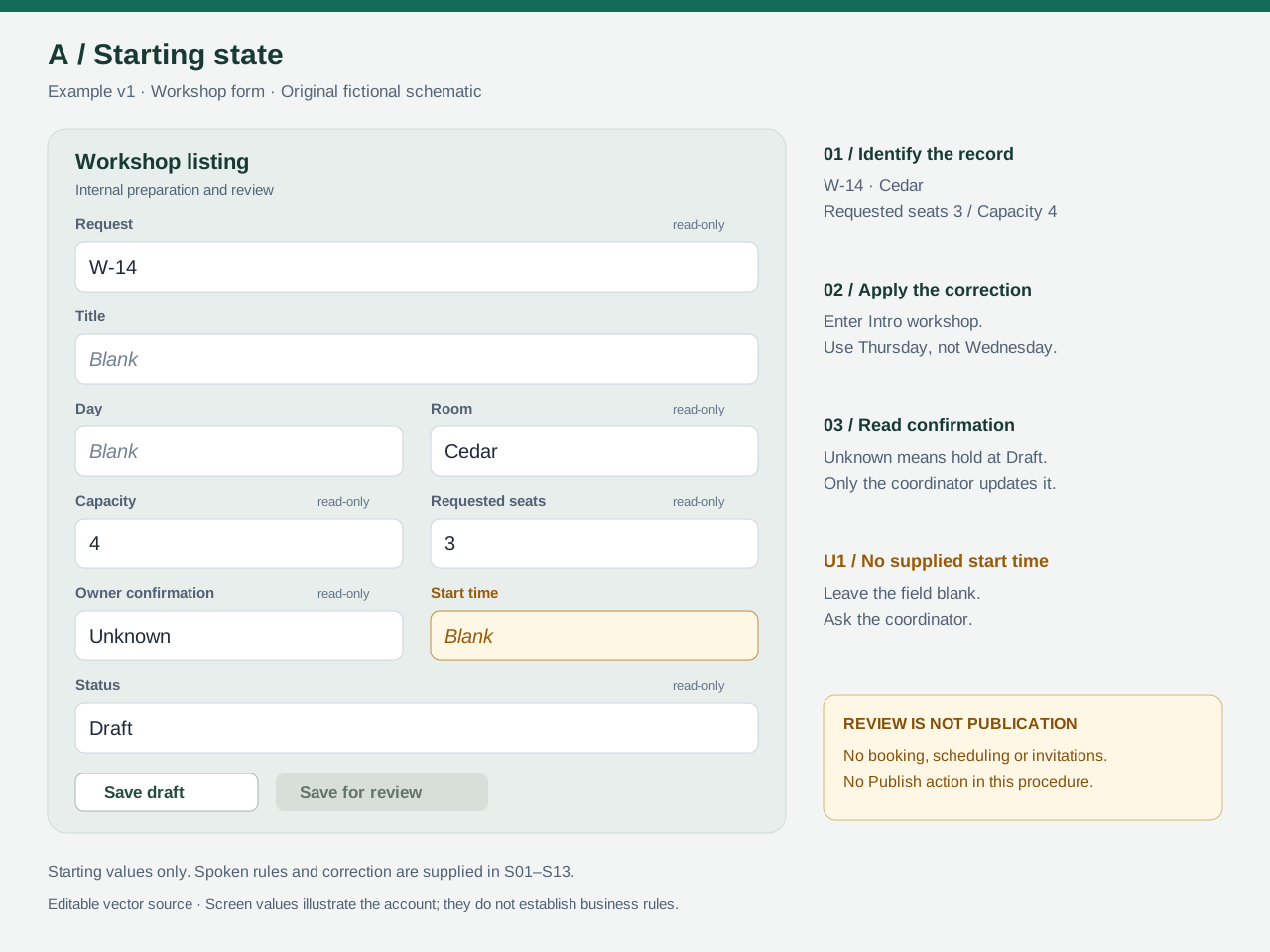
Screen A is the starting state. It shows the record and visible values. The narration supplies the reason to check capacity, the day correction, the meaning of confirmation and the operator's authority.
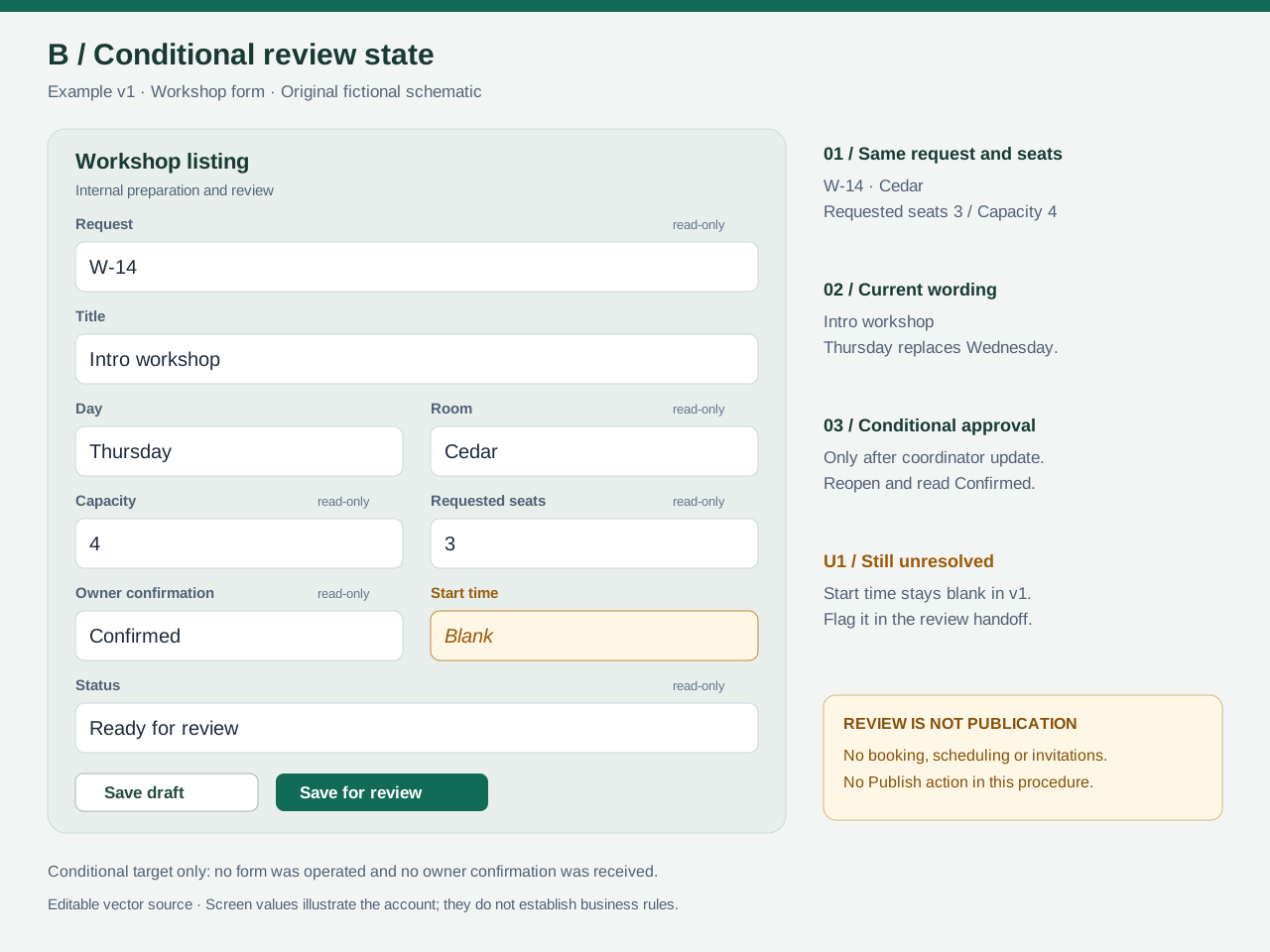
Screen B is a conditional target. It illustrates what the record should show if the coordinator updates confirmation and the review save succeeds. Drawing it does not show that confirmation was received or a save occurred. If the live field is still Unknown, the operator takes the Draft branch instead.
| What the SOP needs | Source in this case | Why a picture alone is insufficient |
|---|---|---|
| Correct request and values | S02–S04; screen A | The field values do not tell the operator which mismatches require a stop. |
| Exact title and corrected day | S05 | A blank form cannot supply the requested title or settle Wednesday versus Thursday. |
| Time left blank | S06, S09 | A blank field could mean many things. The account explicitly allows v1 internal review with the gap flagged. |
| Who may confirm | S07–S08 | A visible Confirmed label does not authorize an editor to set it. |
| Review state and verification | S10–S12; conditional screen B | An intended after-state cannot establish that a save persisted or that publication occurred. |
Keep these references beside the SOP. If an AI draft adds “choose 09:00” or “mark the owner confirmed,” it has supplied knowledge absent from the account. Remove that addition and return the question to the coordinator.
Give the colleague the complete SOP
The procedure below reorganizes the supplied knowledge. It ends at a verified review handoff or an explicit hold. The v1 rule permitting a blank time comes from S09; it is not an assumption about how workshop systems normally work.
SOP: prepare workshop request W-14 for internal review
Version: example v1, an invented teaching version. Process owner: coordinator. Operator: listing editor. Confirmation source: workshop owner, recorded by the coordinator. Reviewer: coordinator or the person they arrange to review the listing.
Purpose and endpoint: prepare the listing and either hand it off as Ready for review or stop with it at Draft. Room booking, scheduling, invitations and publication are outside this procedure. The only unresolved value in this case is the start time.
Before starting: you need editor access to the example v1 Workshop form and request W-14. On a first pass, use screen A's starting values. On a return after the coordinator updates confirmation, use the saved draft, whose title and corrected day may already be filled. Do not follow this version on a renamed or changed form. [S01–S03, S08]
Procedure
| Step | Operator action | Check before continuing | Source |
|---|---|---|---|
| P1 | Open W-14 in the example v1 Workshop form. |
Request W-14; Room Cedar; Capacity 4; Requested seats 3; Status Draft. On the first pass, Title, Day and Start time are blank and Owner confirmation is Unknown. On a return from the confirmation hold, Title may already be Intro workshop, Day Thursday, and confirmation may be Confirmed; Start time remains blank in this supplied case. Stop for access, identity, version or other unexpected differences. |
S02–S03, S08; screen A |
| P2 | Compare Requested seats with Capacity without changing either. | 3 <= 4: continue. If requested seats exceed capacity, retain Draft, stop and ask the coordinator. Do not change seats, capacity or room to make the check pass. |
S04 |
| P3 | Enter or retain Title Intro workshop and Day Thursday. Leave Start time blank. |
The title is exact. Thursday replaces the spoken Wednesday; do not keep both days. Record the correction in the handoff notes. The time is absent, not zero or a suggested default. | S05–S06 |
| P4 | Read the current Owner confirmation field. | If Unknown, follow E1 below and stop this pass. If Confirmed, continue to P5. The listing editor must not edit confirmation. For any other value or an unexpected concurrent change, follow E3. |
S07–S09, S13 |
| P5 | Recheck the complete record, then choose Save for review. |
Confirmed owner; Title Intro workshop; Day Thursday; Room Cedar; Capacity 4; Requested seats 3; blank Start time. Example v1 permits this blank time for internal review. Expected saved Status: Ready for review. |
S09–S10; screen B is the conditional target |
| P6 | Reopen W-14 after saving. | All P5 values remain, including the blank time, and Status reads Ready for review. If a save fails or values differ, stop under E2. A button click alone is insufficient. |
S11; screen B |
| P7 | Give the coordinator the handoff below. | The missing time and day correction remain visible. State the observed saved status only after P6. Do not claim that the listing was scheduled or published. | S12 |
Exceptions and stops
| Branch | Trigger | Action and retained state | Condition for resuming |
|---|---|---|---|
| E1 — confirmation hold | Owner confirmation is Unknown. |
Use Save draft to retain the title and corrected day. Reopen and check Status Draft and blank Start time. Ask the coordinator to obtain confirmation and update its field, and ask for the missing time. End this pass. |
After the coordinator updates confirmation, reopen W-14 at P1 using the saved-draft variation; repeat the seat check and read confirmation again. In v1, the time can remain blank for review. [S07–S09, S11] |
| E2 — save or verification failure | A save fails, or reopened values/status do not match the intended saved state. | Stop. Report the exact observed difference to the coordinator. Do not claim success or try a different status to bypass the problem. | Coordinator resolves the discrepancy and confirms the record/version to use; restart the relevant checks before another save. [S02, S11] |
| E3 — unexpected state | Wrong request/version, a different starting value, an unsupported confirmation value, or a change by another editor. | For a first-pass mismatch, stop before editing. For a later change, keep or return to Draft only if permitted without overwriting another person's work; otherwise leave the record untouched. Ask the coordinator to reconcile it. |
Coordinator identifies the correct record, version and values. Recheck from P1; do not generalize from this case. [S02–S03, S13] |
| E4 — capacity hold | Requested seats exceed Capacity. | Keep Status Draft, stop, and ask the coordinator. Do not change either number or substitute a room. |
Coordinator supplies a resolved request; recheck its identity and capacity before resuming. [S04] |
Review handoff for the conditional Confirmed path
Use this only after the saved state in P6 has actually been verified. In this teaching example it is a proposed handoff, not a message that was sent.
W-14 — Intro workshop
Day: Thursday (corrected from the earlier spoken Wednesday)
Room: Cedar
Requested seats: 3; Capacity: 4
Owner confirmation: Confirmed
Saved status: Ready for review
Start time unresolved; left blank. Please supply it before any later
scheduling decision.
Prepared for internal review only; no publication performed.
For E1, report Draft and Owner confirmation: Unknown instead. Ask the coordinator to obtain confirmation, update its field and supply the start time. Do not reuse the Confirmed-path handoff unchanged.
Open item U1: What start time should be entered for W-14? Answer owner: coordinator. Answer supplied: none. Current treatment: blank in the form; explicit question in either handoff. [S06, S08–S09, S12]
Use a bounded drafting request
Attach the complete account and both labeled screen references, then use a request like this. On your own process, replace the material with information the operator and process owner can verify. Sharing a real recording or screenshot may require removing private details first.
Turn the supplied process account and screen references into a draft SOP
for another person to follow. Prepare the document only; do not operate
the form, contact anyone, schedule anything or publish anything.

Inputs:
- Complete spoken account with source labels.
- Screen A: the starting state.
- Screen B: a conditional target state, not evidence of a completed run.
- The form version and the roles named in the account.

Return:
1. Purpose, operator, process owner, prerequisites and endpoint.
2. Numbered actions, each with its expected state and source reference.
3. Conditional branches, stop points and conditions for resuming.
4. Unresolved questions, with an answer owner and temporary treatment.
5. A complete handoff example that distinguishes prepared, saved,
   verified and published states.
6. A second-reader walkthrough plan with expected results but blank
   actual observations and outcomes.

Preserve exact field names, title, request ID, room, numbers and statuses.
Use the speaker's explicit later correction as the current day; retain
the superseded day only in the correction note. Do not infer confirmation
from another step, and do not invent a start time.

Show when an instruction comes from narration rather than a visible
screen. A screen value does not establish a business rule by itself.
If a step needs knowledge the inputs do not supply, identify the gap and
ask the process owner. Do not add a plausible operational rule.

Keep the output tied to this supplied form version. Flag a changed label
or rule for revision instead of silently adapting the old procedure.
Ask a second person to walk through the draft
Give a colleague the v1 account, screen A, screen B, the SOP and a blank observation record. Ask them to describe or simulate the next action from the supplied state. They should be able to point to a field, state a condition and identify a stop without the original narrator supplying extra rules.
For a real procedure, arrange an appropriate practice environment with the process owner first. The static diagrams here cannot establish access rights, persistence, error behavior or whether a real interface works this way.
Use the cases below as proposed checks. The expected results are derived from the authored sources. No second reader has performed them; all actual-result cells are intentionally empty. A blank cell does not mean a pass.
| Case | Give the reader | Expected from this source pack | Actual observation | Outcome |
|---|---|---|---|---|
| T1 | Screen A and the complete spoken account | Identifies W-14, Cedar, 3 within 4; uses Thursday rather than Wednesday; leaves Start time blank; does not publish. | ||
| T2 | The prepared v1 draft with Owner confirmation Unknown |
Saves/retains Draft, verifies it, asks the coordinator for confirmation and time, and ends the pass. Does not write Confirmed. |
||
| T3 | A hypothetical coordinator update to Confirmed; all other v1 facts unchanged |
Reopens W-14, repeats identity/seat checks, rereads confirmation, uses Save for review, and checks for Ready for review. Leaves time blank and flags U1. This is a conditional exercise, not evidence of a received confirmation. |
||
| T4 | A hypothetical capacity mismatch: requested seats 5, capacity 4 | Stops at the identity/value or capacity check, retains Draft and asks the coordinator; does not change numbers or room. |
||
| T5 | A hypothetical save that reopens as Draft after the review save |
Reports the observed mismatch; does not claim Ready for review or try another status. | ||
| T6 | The v2 change note, while W-14's time is still absent | Detects both label and rule changes; holds at Draft, asks for time, and rejects v1 screen B as a valid v2 target. |
Record the exact confusing instruction or unsupported assumption, not just “unclear.” The process owner supplies operational answers; the document author then revises the affected step and its source map. Only a later completed observation record can show what a second reader actually managed to follow.
Revise the instruction when the form or rule changes
Imagine the coordinator supplies the following fictional example v2 change note. These version labels are teaching labels, not real releases or publication dates:
R01: Owner confirmation is renamed Owner approval. It remains read-only
for the listing editor. Unknown still means stop at Draft.
R02: Save for review is replaced by Send to review. This now requires a
supplied Start time, Confirmed approval and a passing capacity check.
A blank Start time must stay at Draft.
R03: W-14, Intro workshop, Thursday, Cedar, Capacity 4 and Requested
seats 3 are unchanged. The coordinator still has not supplied the time.
R04: Save draft remains available. Reopen and verify the draft, then ask
the coordinator for the missing time and, if needed, owner approval.
Do not use the old review action. Publication stays outside this task.
This new source changes the rule as well as the label. Replacing the button's name in the old SOP would leave a wrong instruction in P5.
| Instruction | Example v1 | Revised example v2 excerpt |
|---|---|---|
| Read confirmation | P4 reads Owner confirmation. |
Read Owner approval; the listing editor still cannot change it. Unknown stops at Draft. [R01] |
| Handle the missing time | P5 can save for internal review with a blank time if confirmation is Confirmed and the capacity check passes. |
Because Start time is still absent for W-14, do not choose Send to review, even with Confirmed approval. Use Save draft, reopen and verify Draft, keep the time blank, and ask the coordinator for it. [R02–R04] |
| Resume a review handoff | The v1 branch can proceed after confirmation alone while time stays unresolved. | A later v2 review handoff needs the supplied time, a fresh approval reading and a repeated capacity check before Send to review; then verify the saved state again. Do not invent the required value. [R02, R04] |
Update P1's version check, P4–P7, the E1 resume condition and U1's treatment together. Screen B is a v1 target and no longer shows a permitted v2 state for this incomplete record. Retire it from the v2 procedure and obtain a new version-specific reference before handing over that revision. Merely changing its caption would conceal the missing prerequisite.
Keep v1 with its source account so old instructions remain explainable. Have the process owner confirm the new rule, then plan another second-reader walkthrough. The excerpt above is an authored revision example; neither version has been used to operate a real form.
The handoff is ready for another reader to try when every action has a source, the reader can identify the current version, and unresolved information still has a named owner. Keep the original account and the procedure together so a correction to the process can become a specific correction to the document.