
Build a Chart You Can Recalculate from Its Source Table
Drafted and reviewed using AI assistance.
On this page
To turn a small table into a reliable chart, define what each number includes before plotting it. Keep the original rows, calculate the plotted series separately, and compare the returned picture with those calculations. If Total already includes Checked, stacking Checked beside Total counts checked items twice. Renaming the second series does not fix its geometry.
This walkthrough includes complete original data, an actual deliberately wrong chart, a complete repair request, and repaired SVG and PNG files. The exhibition-card case and its error were authored for teaching. They are not real exhibition records, captured model output or a test of an AI service.
Decide what the chart should answer
The fictional reader needs to see how many information cards are checked and how many remain in each exhibition batch at one snapshot. This is a count comparison with a part-to-whole relationship. A stacked horizontal bar makes the total visible while keeping both parts on the same count axis.
You could explain that goal aloud, then retain the exact data and definitions as text. Voice input is optional; it does not verify a number or settle what Total means. For four rows, you can also make the chart directly in a spreadsheet or keep the table alone.
Here is the entire original CSV:
snapshot_utc,batch_id,batch_label,total_cards,checked_cards
2030-06-12T14:00:00Z,E01,Harbour,12,9
2030-06-12T14:00:00Z,E02,Garden,20,8
2030-06-12T14:00:00Z,E03,Machines,16,0
2030-06-12T14:00:00Z,E04,Night,8,8
The complete source definitions fix the interpretation:
- One row is one batch at the fictional 12 June 2030, 14:00 UTC snapshot. The unit is cards.
- The four batches are disjoint. Each card is either Checked or Remaining, and Total includes both states.
Remaining = Total - Checked. The checked share isChecked / Total.- Machines has an explicit zero checked. Night is fully checked. Neither condition is a missing value.
- Catalogue order is E01 through E04; it is not a ranking of people or performance.
Checking the card text does not establish publication approval or visitor understanding. Those would need different records.
Calculate both parts before drawing them
These are all the rows of the repaired chart data, with the calculation made visible:
| Batch | Total | Checked | Remaining calculation | Remaining | Checked share |
|---|---|---|---|---|---|
| E01 Harbour | 12 | 9 | 12 − 9 | 3 | 9/12 = 75.0% |
| E02 Garden | 20 | 8 | 20 − 8 | 12 | 8/20 = 40.0% |
| E03 Machines | 16 | 0 | 16 − 0 | 16 | 0/16 = 0.0% |
| E04 Night | 8 | 8 | 8 − 8 | 0 | 8/8 = 100.0% |
Every count is an integer. Percentages are rounded to one decimal for display; the bar lengths use counts. All four supplied totals are positive. If another input has a zero total, its checked share is undefined; do not silently turn it into 0%.
Across the disjoint batches there are 56 cards, 25 checked and 31 remaining. The combined share is 25/56, or 44.6% to one decimal. Averaging the four displayed percentages would answer a different question and give 53.8%; it would give an eight-card batch the same weight as a twenty-card batch.
Inspect the complete wrong chart
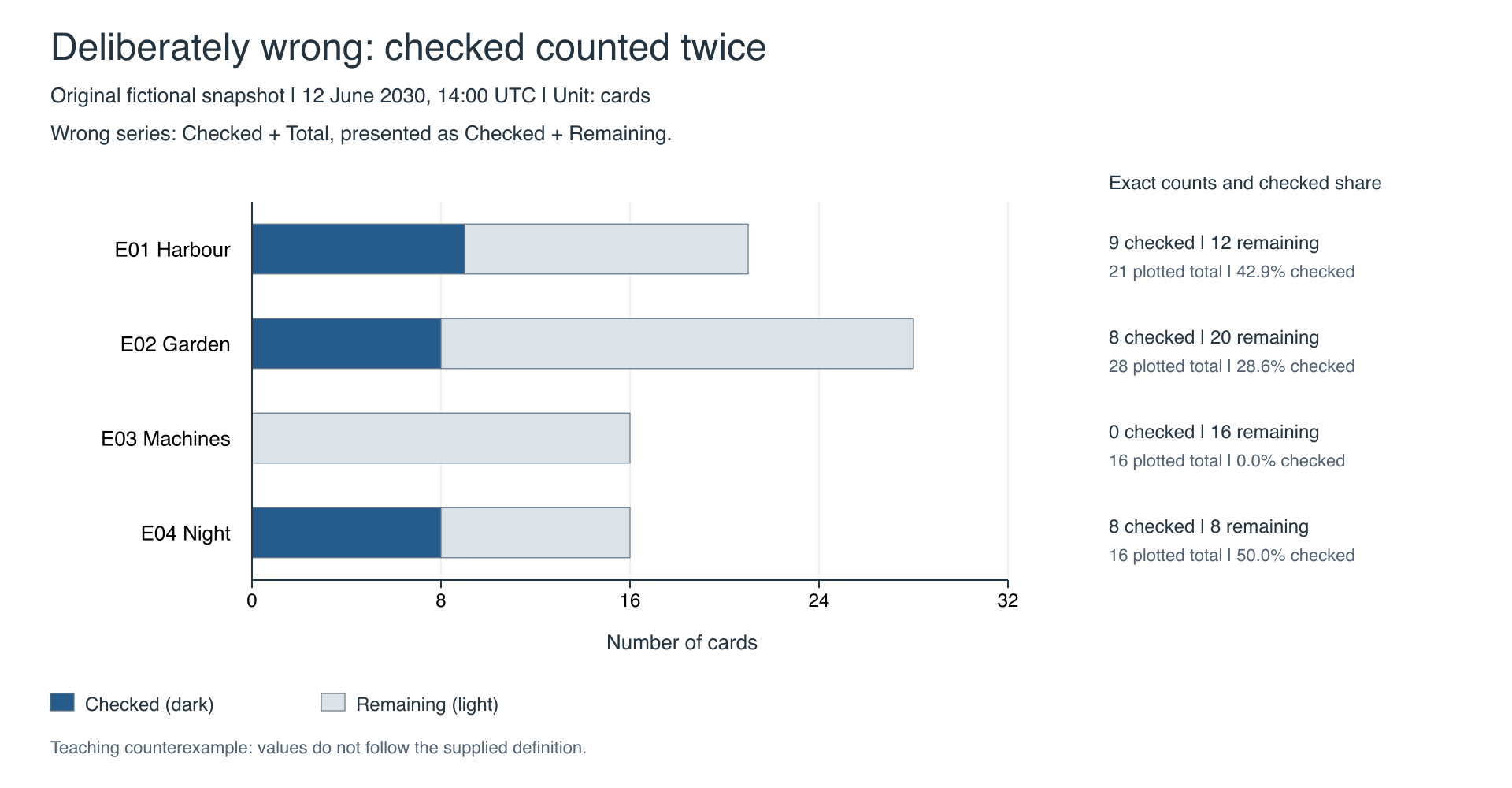
Download the actual wrong SVG, wrong PNG and wrong plotted data. These are complete authored counterexamples, not screenshots of a model failure.
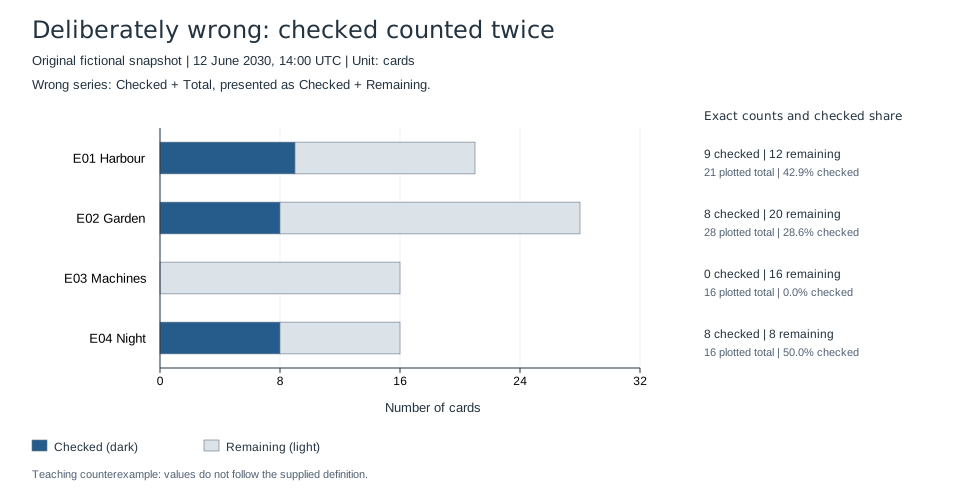
The mistake is the second series. It uses the whole Total but calls that series Remaining:
| Batch | Checked series | Incorrect “Remaining” series | Wrong plotted total | Wrong checked share |
|---|---|---|---|---|
| E01 Harbour | 9 | 12 | 21 | 9/21 = 42.9% |
| E02 Garden | 8 | 20 | 28 | 8/28 = 28.6% |
| E03 Machines | 0 | 16 | 16 | 0/16 = 0.0% |
| E04 Night | 8 | 8 | 16 | 8/16 = 50.0% |
Night makes the error especially clear. Its eight cards are all checked, yet the wrong chart adds another eight as remaining and makes the share look like 50%. Machines happens to look right because its checked count is zero. One plausible row therefore cannot validate the whole chart.
The four wrong bars add to 81 plotted cards, although the input contains only 56. Checked cards have been counted twice: once in Checked and again inside Total. Changing the percentage label to 100% would leave Night's light segment and total length wrong.
Send the whole repair task, not just a complaint about the percentage
The complete standalone repair request includes the full original CSV, complete definitions, wrong plotted CSV and the entire wrong SVG source. It needs no earlier chat or hidden attachment to explain the error. The PNG above is a raster preview of that SVG.
The request asks for a complete replacement figure and its data. Its essential instruction is to return to the untouched inputs, derive Remaining for every row, and update the plotted segments and labels together. It preserves the snapshot, four batches, catalogue order and count unit. It also asks for the full text alternative and a real change-and-regenerate check.
If you adapt it, replace all those inputs together. A statement such as “fix the chart” cannot tell an assistant whether the chart has the wrong source range, overlapping categories, a changed definition or only a formatting problem.
Read the repaired figure beside the data
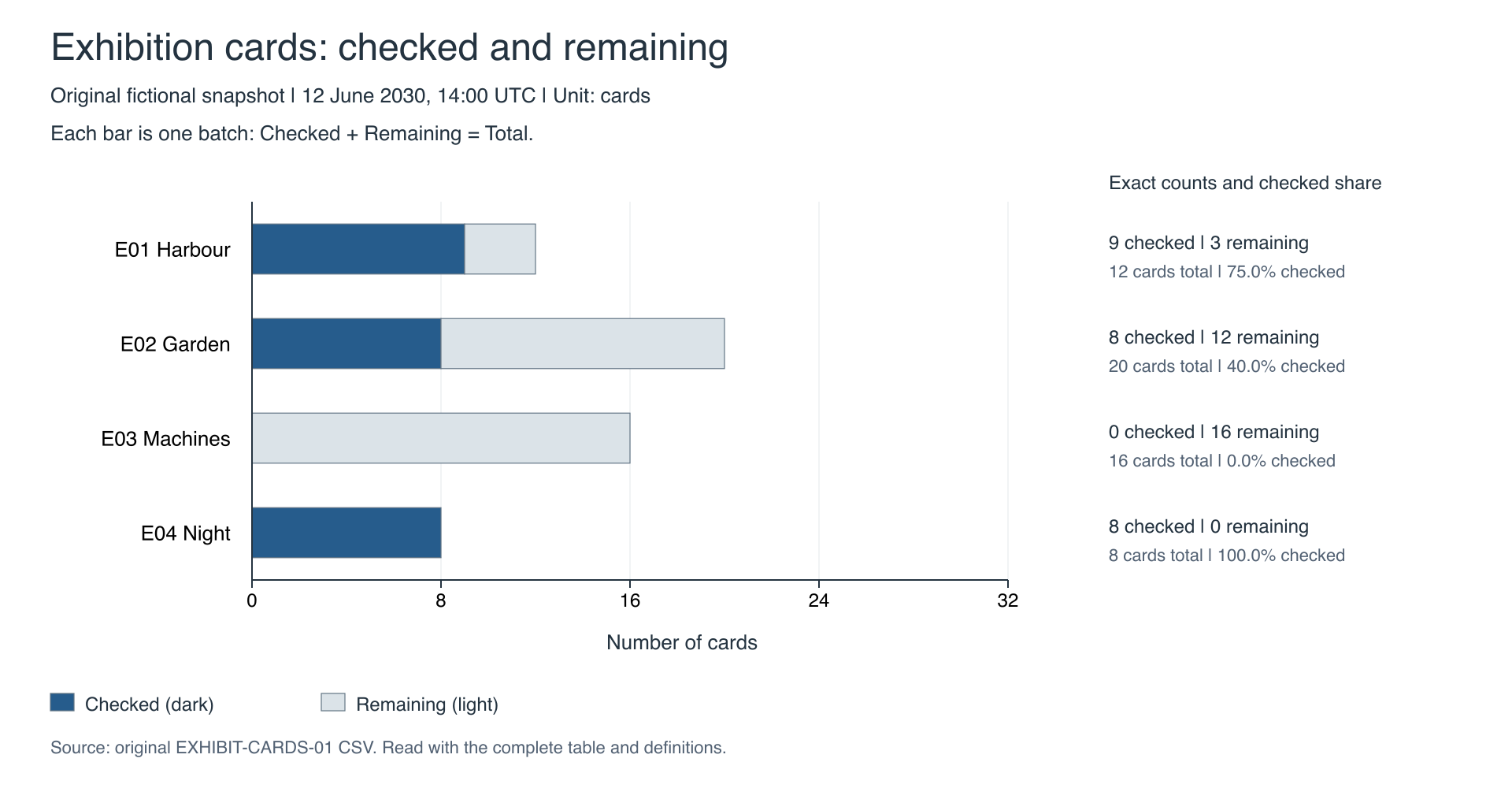
Figure 1 — Exhibition cards checked and remaining. Four disjoint fictional batches at 12 June 2030, 14:00 UTC. Source: original EXHIBIT-CARDS-01 CSV and definitions. Download the repaired SVG, PNG preview and complete caption, text alternative and table.
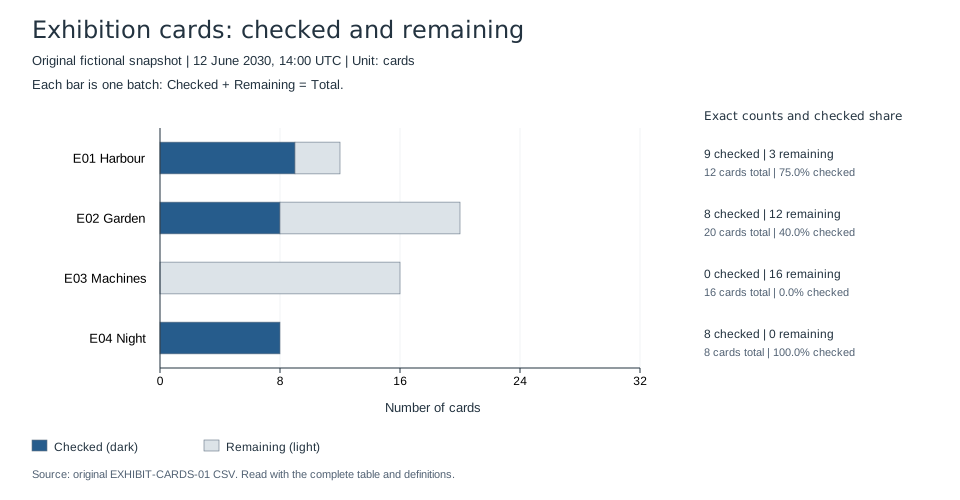
The repaired bars have lengths 12, 20, 16 and 8 cards. The dark and light segments now add to each supplied total. Machines has only the light segment; Night has only the dark segment. Their zero counts remain in the written labels even though a zero-width segment is not drawn.
For exact lookup at a small display size, use the accompanying table or open the SVG at a larger size. The static picture does not rearrange its labels when narrowed.
Both teaching figures use the same 0–32 card axis. Keeping that scale fixed makes the before-and-after lengths directly comparable. The wider limit also leaves room for the deliberately wrong 28-card bar; it does not mean a batch contains 32 cards. The percentages beside the bars are supplementary labels, not a second axis.
Text alternative: a horizontal stacked bar chart shows Harbour with 9 checked and 3 remaining out of 12 cards; Garden with 8 and 12 out of 20; Machines with 0 and 16 out of 16; and Night with 8 and 0 out of 8. Catalogue order runs top to bottom. Dark Checked and light Remaining fills share one count axis, with exact counts and checked shares beside every row.
Follow a number all the way into the picture
For Garden, the untouched row says Total 20 and Checked 8. Remaining is 12. In the actual repaired SVG, the count scale is 15 drawing units per card, starting at x=160. The dark segment has width 120; the light segment starts at x=280 and has width 180. Together they end at x=460, the position for 20 cards. Those are properties of the actual generated rectangles, not merely the intended chart settings.
The same check covers every batch, including the absent zero-width segments. A separate local checker reads the raw and derived CSVs, inspects transformed SVG geometry and the real axis anchors, and samples the interior fill of each nonzero segment in the rendered PNG. It also checks the complete direct labels. That checks binding from source to output; a successful file save alone would not do so.
The local figures were built with ReportLab 4.4.9 and rasterized with Sharp 0.35.5. The chart builder and PNG renderer are supplied for readers who already use those libraries. SVG is the vector source for this static figure. It is not a native Excel chart or a guarantee that importing it into an office application creates editable data series.
Change one input and check what really moves
We actually changed Garden's Checked count in the source CSV from 8 to 10, keeping Total at 20, and regenerated a separate candidate. The resulting row has 10 checked, 10 remaining and a 50.0% checked share. The dark SVG width increased from 120 to 150 drawing units; the light width decreased from 180 to 150. Its endpoint stayed at 20 cards. The other three rows stayed unchanged.
The changed input, derived data, SVG and PNG preserve that temporary exercise. They are a changed-input variant of the fictional case, not a later observation of a real exhibition.
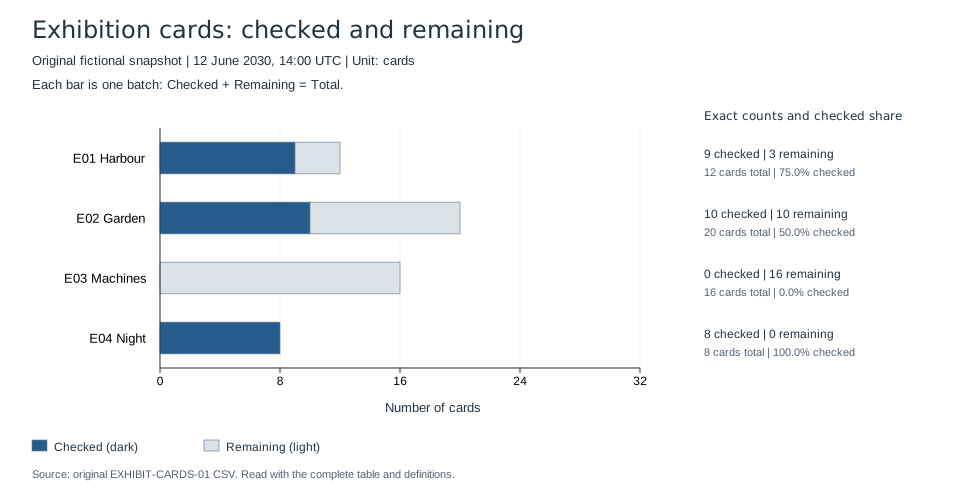
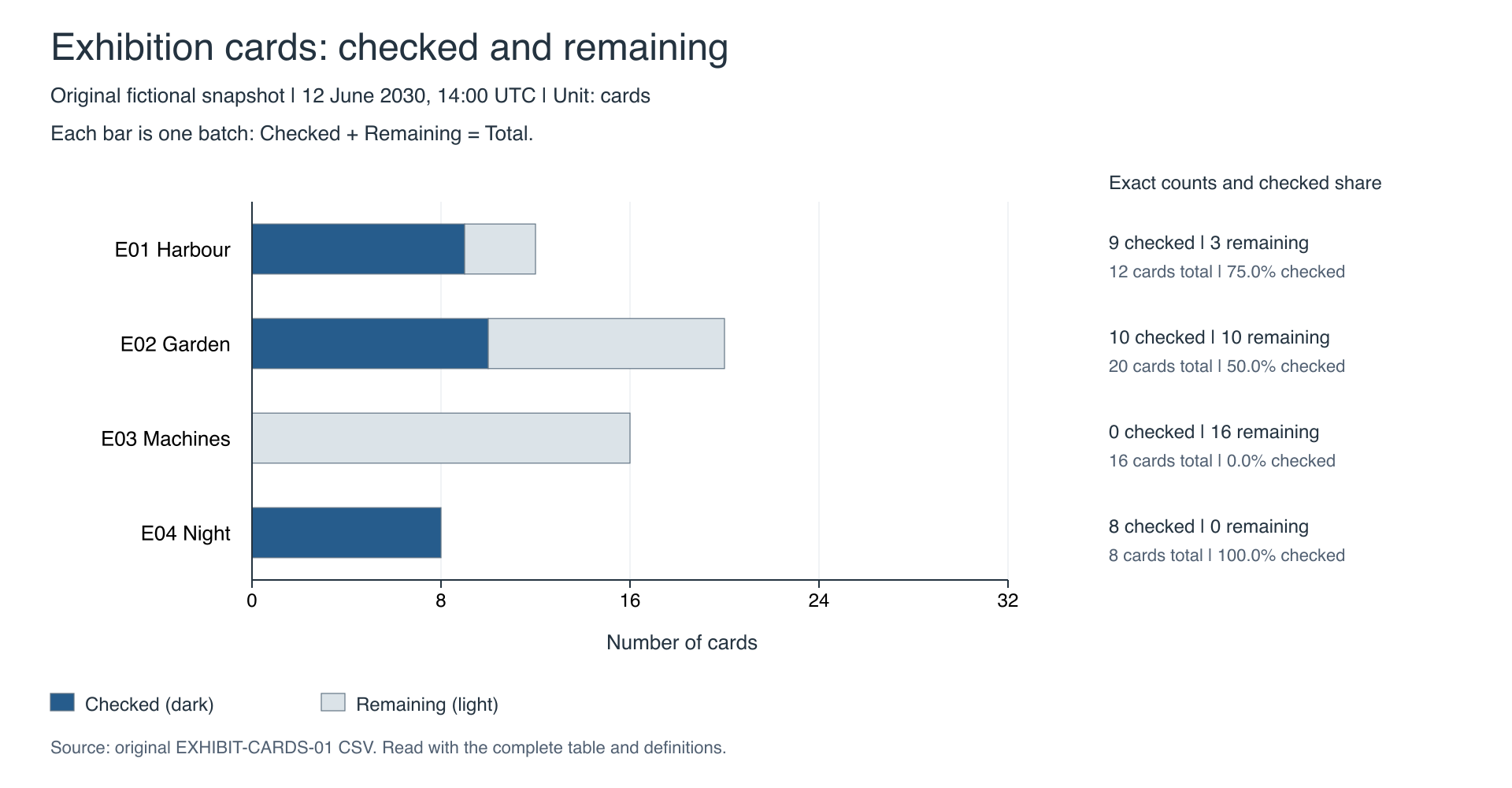
We then restored the original CSV bytes and regenerated both baseline figures. All six baseline output hashes—two plotted CSVs, two SVGs and two PNGs—matched their saved pre-change hashes. The verification script can repeat the bounded exercise in a copy of this directory with the stated dependencies available. It performs the arithmetic and geometry checks separately from the chart-building implementation.
Choose a simpler result when it answers the question
For four exact rows, the complete data table may be enough. A spreadsheet chart created manually from Checked and calculated Remaining is another route. Keep the same definitions and inspect the returned plot whichever route you choose; an AI tool is optional.
The motivation is a limited public question about inconsistent chart percentages. Its author later reported changing the selected inputs to completed and total-minus-completed. We have not inspected or reproduced that person's workbook. The example here uses entirely new data and demonstrates a related denominator mistake; it does not diagnose their file.
The Government Analysis Function chart checklist supplies publication guidance on zero-based bars, sources, data downloads and text alternatives. The local checks above do not certify accessibility or native-office compatibility. They establish a narrower, useful result: these static figures, their source values and the recorded input change agree within this complete teaching case.